Vocera Alternatives for Long-Term Care: Compliance First

Vocera Alternatives for Long-Term Care: Compliance First
For long-term care administrators evaluating Vocera alternatives, the right category is not another badge-based voice system. It is a phone-first, mobile task-and-compliance platform that pairs secure messaging with surveyor-ready reporting exports and payroll/regulatory support. CMS survey cycles and HIPAA documentation requirements do not wait for hardware upgrades. The shortlist below reflects that reality.
Top categories to evaluate:
- Phone-first LTC operations suites — mobile checklists, task management, compliance libraries, and raw regulatory export files built for skilled nursing workflows. Myltcapps leads this category.
- Enterprise secure-messaging platforms (TigerConnect, Spok) — HIPAA-compliant messaging and alarm routing, strong in hospital settings, but limited native LTC task management and surveyor-ready reporting.
- Badge-based voice and alarm systems (Vocera, Ascom) — purpose-built for real-time voice and alarm routing; hardware-dependent and costly to maintain in nursing home environments.
- EHR communication modules (PointClickCare, MatrixCare) — strong clinical data integration, but operational task management and compliance exports often live outside their core scope.
Recommended pick: Myltcapps. It is the only option in this shortlist built specifically around LTC operational KPIs: task completion, survey readiness, payroll-deduct cafeteria orders, and jurisdictional regulatory exports from a single mobile interface.
Table of Contents
- Which Vocera alternatives actually fit long-term care priorities?
- How do these alternatives differ from Vocera in day-to-day operations?
- What should your procurement checklist include?
- What implementation barriers should you plan for?
- Why Myltcapps fits long-term care operations
- What do users say about these alternatives?
- Key Takeaways
- The gap most administrators discover too late
- See Myltcapps in action for your facility
- Authoritative sources for your procurement process
Which Vocera alternatives actually fit long-term care priorities?
| Dimension | Phone-first LTC suite | Enterprise secure messaging | Badge-based voice/alarm | EHR communication module |
|---|---|---|---|---|
| Best fit | SNF/LTC operations | Hospital/health system | Acute care, large campuses | Facilities already on that EHR |
| Core capabilities | Task mgmt, messaging, compliance exports, scheduling | Secure messaging, alarm routing | Voice, alarm routing | Clinical messaging, care coordination |
| Mobile-first vs hardware | Mobile-first, BYOD | Mobile app + integrations | Hardware badge required | Mobile app, EHR-dependent |
| Surveyor-ready reporting | Native export files, seeded libraries | Limited | None | Partial, clinical focus |
| Payroll/regulatory support | Yes, jurisdictional exports | No | No | Partial |
| EHR/nurse-call integration | PointClickCare, MatrixCare compatible | Broad EHR APIs | Nurse-call systems | Native EHR only |
| Deployment complexity | Low, app-based | Moderate | High, hardware rollout | Moderate |
| Pricing shape | Per-facility SaaS | Per-user enterprise | Hardware + licensing | Bundled with EHR |
| Training timeline | Days to weeks | Weeks | Weeks to months | Weeks |
| Support signals | LTC-specific references | Hospital references | Hospital references | EHR vendor support |
Quick recommendations by category:
- Phone-first LTC suite: Best fit for most skilled nursing facilities. Use when survey readiness, task ownership, and payroll exports are the primary drivers.
- Enterprise secure messaging: Worth evaluating if your facility is part of a larger health system that already uses TigerConnect or Spok for hospital-side communication. Expect to add a separate task management layer.
- Badge-based voice/alarm: Appropriate for large campuses with existing infrastructure investments. Avoid if you are starting fresh — hardware lifecycle costs and inventory management add significant overhead in nursing home settings.
- EHR communication module: Useful as a supplement to your existing PointClickCare or MatrixCare deployment, not as a standalone operational platform.
How do these alternatives differ from Vocera in day-to-day operations?
The clearest operational difference is this: phone-first platforms layer lightly over existing workflows, while badge-based systems like Vocera require staff to carry and manage dedicated hardware. That distinction drives most of the downstream cost and adoption differences.
Practical differences administrators notice within the first 90 days:
- Device management vs BYOD phones: Badge systems require inventory tracking, battery management, charging stations, and replacement budgets. BYOD phone platforms eliminate that overhead almost entirely.
- Voice-first vs text-first workflows: Vocera and Ascom prioritize real-time voice. Most LTC workflows — task assignments, compliance checklists, maintenance tickets — are better served by asynchronous text and task-based interfaces that create an audit trail.
- Alarm routing granularity: Enterprise messaging platforms like Spok offer sophisticated alarm escalation. Phone-first LTC suites handle alerts and notifications with enough granularity for most nursing home needs without the enterprise configuration overhead.
- Escalation and audit trails: Text-and-task platforms generate timestamped records by default. Voice-only systems often require a separate documentation step, which is where interoperability gaps create clinical and documentation errors.
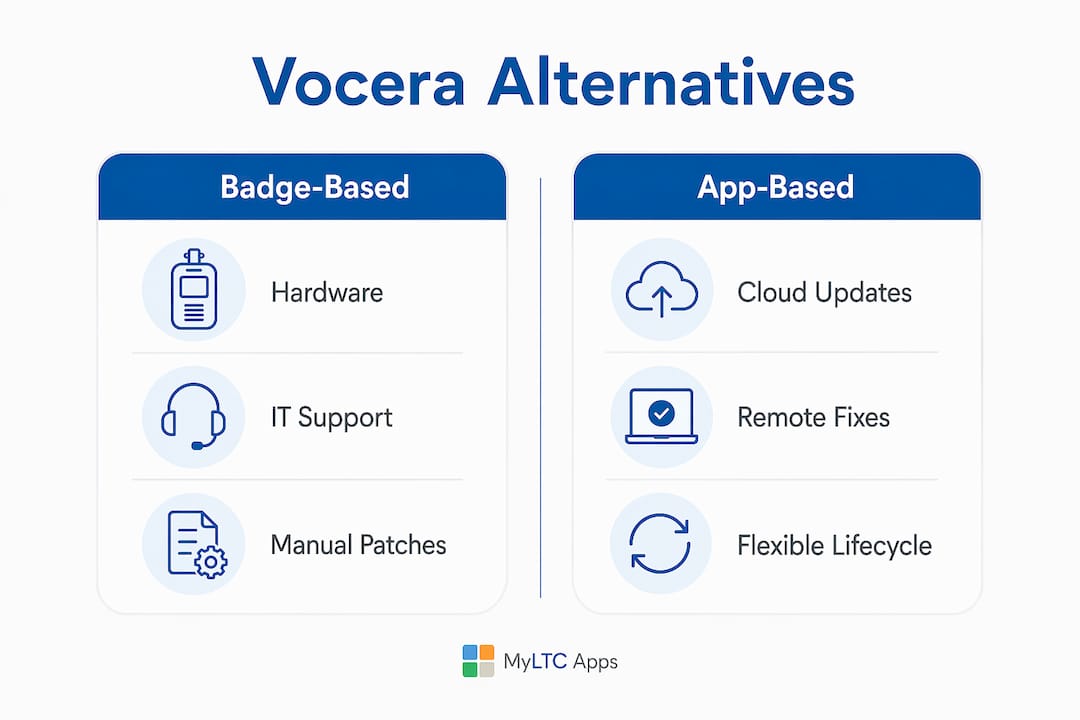
Hardware vs app lifecycle: A badge device has a multi-year replacement cycle, requires on-site IT support, and breaks. A phone app updates silently overnight. For rural Kansas facilities without a dedicated IT department, that difference is not theoretical — it is a weekly operational reality. The LTPAC companion approach accounts for exactly this constraint.
Pro Tip: Before any vendor demo, ask the vendor to show you what happens when a device fails at 2 AM on a weekend. The answer tells you more about real-world fit than any feature checklist.
Facilities that choose badge-based systems without a clear hardware support plan often end up with a manual patchwork: staff texting on personal phones while badges sit in charging stations. That workaround is a documented source of integration friction and staff resistance.
What should your procurement checklist include?
Designate a project owner first. An administrator, DON, or finance lead who ties product capabilities to operational KPIs — labor cost, census, survey readiness — is the single most important leadership action before any vendor conversation begins.
| Checklist Item | What to Verify |
|---|---|
| Raw regulatory export files | Vendor demonstrates actual export format matching state/federal portal requirements |
| EHR integration endpoints | Live demo of PointClickCare or MatrixCare data handoff |
| Nurse-call system compatibility | Confirm integration or documented workaround |
| Payroll/jurisdictional support | Automated export and reconciliation for your state |
| Training and support plan | Super-user model, timeline, ongoing support SLA |
| Hardware inventory plan | Device count, replacement budget, or BYOD policy |
| Pilot acceptance criteria | Task completion rate targets, staff satisfaction threshold |
| Total cost of ownership | Licensing, hardware, implementation, and year-2 costs |
Questions to ask during vendor demos:
- Show me the raw regulatory export file — not a screenshot, the actual file.
- Demonstrate the EHR data handoff in a live environment.
- Walk me through a mobile task assignment from creation to completion.
- Confirm which payroll and jurisdictional rules your system handles for Kansas facilities.
Requiring a live demonstration of raw export files is the single best way to avoid paying for a system that forces manual rekeying into state portals. Many administrators discover this gap only after go-live.
What implementation barriers should you plan for?
Implementation fails most often when connectivity, training, and ownership are under-resourced before the first user logs in. Nursing homes frequently underinvest in IT infrastructure — wireless coverage, on-site support, and staff training — and that gap shows up as slow adoption and workarounds.
Risk mitigation steps:
- Connectivity audit first: Map wireless coverage across all care areas before selecting a platform. Dead zones kill adoption faster than any training deficit.
- Super-user model: Identify 2–3 staff per shift who receive deeper training and serve as first-line support. Research on wireless nurse-call implementations found that managerial support and super-users were decisive for successful adoption.
- Staged feature rollout: Launch with core task management and alerts. Add compliance libraries, scheduling, and payroll features in weeks 4–8 after staff are comfortable with the basics.
- Pilot acceptance criteria: Define measurable signals before go-live — task completion rates, reduction in verbal handoffs, staff satisfaction scores — and assign a named person to sign off.
A UCSF review of HIT implementation in nursing homes recommends readiness assessments and ongoing training as prerequisites, not afterthoughts. Facilities that skip the readiness step routinely restart implementations within 18 months.
The rural nursing home context adds another layer: limited IT staff and inconsistent connectivity mean that app-based platforms with offline capability and minimal configuration overhead have a structural advantage over hardware-dependent systems.
Why Myltcapps fits long-term care operations
Myltcapps reduces administrative rework, accelerates survey preparation, and gives every task a clear owner — all from a phone. That is the operational case in one sentence.
Feature-to-KPI mapping:
- Mobile-first checklists and task management: Staff complete and document tasks from personal devices, creating timestamped audit trails without a separate documentation step. The EVS and housekeeping module is a practical example of this in daily use.
- Seeded compliance libraries: HIPAA, Section 1557, dietary, QAPI, and emergency preparedness libraries come pre-loaded. You are not building compliance workflows from scratch.
- Surveyor-ready export capability: Raw export files are available on demand. Black Book Research found that survey readiness and defensible staffing analytics rank among the top functional priorities for post-acute buyers.
- Payroll-deduct cafeteria orders: Dining management and payroll deduction handled inside the same platform, reducing the manual reconciliation that typically falls on the business office.
- Work tickets and maintenance tracking: Facilities use work order management to close the loop on maintenance requests with a documented record — useful during surveys.
- Kansas jurisdictional readiness: The platform is built with KDADS-ready exports for Kansas facilities, so state-specific regulatory reporting does not require manual translation.
Pro Tip: During your Myltcapps demo, ask specifically to see the surveyor-ready export and the seeded QAPI library. Those two features alone can cut survey preparation time significantly for most facilities.
What do users say about these alternatives?
User feedback across LTC communication platforms clusters around a few consistent themes. Administrators who switched from badge-based systems to phone-first platforms most often cite reduced device management overhead and faster staff adoption as the primary gains. The friction point is almost always the same: any platform that adds a step to an existing workflow gets abandoned by floor staff within weeks.
Facilities using enterprise secure-messaging platforms report strong satisfaction with alarm routing and escalation, but consistently note that task management and compliance documentation require a separate tool. That gap drives the “manual patchwork” problem that procurement teams underestimate before purchase.
Phone-first LTC suites receive the strongest satisfaction scores among nursing home administrators specifically because the platform matches how staff already work — on their phones — rather than requiring behavioral change around new hardware.
Key Takeaways
For long-term care administrators, the best Vocera alternative is a phone-first platform that combines task management, seeded compliance libraries, and raw regulatory export capability in a single mobile interface.
| Point | Details |
|---|---|
| Shortlist by category | Evaluate phone-first LTC suites first; add enterprise messaging only if you are part of a larger health system. |
| Require raw export demos | Ask every vendor to show the actual regulatory export file — not a summary report — before signing. |
| Assign a project owner | One named person ties platform capabilities to operational KPIs before procurement begins. |
| Plan a staged pilot | Launch core task management first; add compliance and payroll modules in weeks 4–8 after staff adoption is confirmed. |
| Myltcapps for LTC | Myltcapps is the recommended pick for Kansas skilled nursing facilities: KDADS-ready exports, seeded compliance libraries, and a BYOD mobile-first model with no hardware overhead. |
The gap most administrators discover too late
The conventional wisdom in LTC technology procurement is to evaluate communication platforms the same way hospitals do: messaging reliability, alarm routing, and EHR integration. That framework misses the most operationally painful gap in nursing home settings.
The real problem is not communication speed. It is documentation completeness. A badge-based voice system can route an alarm in seconds and leave zero audit trail. A phone-first task platform can route the same alert, assign it to a named staff member, and generate a timestamped completion record — all in one step. During a survey, that difference is the difference between a defensible record and a citation.
Administrators who frame their platform search around survey readiness and payroll/regulatory exports rather than communication speed end up with a system that serves the business, not just the clinical team. That reframe is what separates a successful implementation from a two-year regret.
See Myltcapps in action for your facility

Myltcapps is built for the operational reality of skilled nursing and long-term care — not adapted from a hospital product. The demo covers surveyor-ready export files, seeded HIPAA and QAPI compliance libraries, mobile task workflows, and payroll/regulatory export capability specific to Kansas facilities. You see the actual raw export format, not a slide deck.
Facilities that schedule a compliance task and checklist demo typically identify 2–3 immediate workflow improvements before the call ends. If your facility operates without a dedicated IT department, the rural LTC deployment track covers connectivity planning and staged rollout in detail. Book a demo at myltcapps.com and request the surveyor-ready export walkthrough as your first agenda item.
Authoritative sources for your procurement process
Use these resources to validate vendor claims, benchmark implementation expectations, and build your RFP requirements.
| Source | Why It Matters for Procurement |
|---|---|
| NCBI: HIT in Nursing Homes | Documents cost, training, and interoperability as the primary implementation barriers; use to build your readiness checklist. |
| UCSF HIT Workforce Report | Recommends readiness assessments, super-user models, and ongoing training as prerequisites for successful adoption. |
| Skilled Care Journal / Black Book Research | Survey readiness and interoperability rank highest among post-acute buyers; use to prioritize evaluation criteria. |
| PMC: Wireless Nurse-Call Implementation Study | Evidence that managerial support and staged rollouts drive adoption; use to structure your pilot plan. |
| ERP LTC Sector Guide | Identifies manual patchwork and missing raw export capability as the most common procurement pitfall. |
Vendor reference checklist — request these from every vendor before signing:
- Case studies with named LTC or skilled nursing references (not hospital-only)
- Written HIPAA and security compliance statements
- Documented payroll and jurisdictional regulatory support for your state
- Integration list confirming PointClickCare, MatrixCare, and nurse-call system compatibility
- Live demonstration of raw regulatory export files in the format your state portal accepts
Never accept a screenshot or summary report in place of the actual export file. If a vendor cannot demonstrate the raw output during a demo, assume it does not exist in a usable form.
Recommended
- A HIPAA Compliance Checklist for Long-Term Care Facilities | MyLTC Apps
- Rural Nursing Home Compliance Software: Closing the Gap Without an IT Department | MyLTC Apps
- Long-Term Care Software for Kansas Facilities (KDADS-Ready) | MyLTC Apps
- Compliance Task & Daily Checklist Software for Long-Term Care | MyLTC Apps