Room & vehicle
reservation system
for long-term care.
Reservations is a facility room reservation system and nursing home vehicle scheduling tool in one app — for skilled nursing facilities and long-term care communities, on the phone your staff already carry. Book the chapel, the activity room, or the family visit room; schedule the wheelchair van for a resident’s appointment — all on one shared calendar that won’t let two bookings collide. No more paper sign-up sheets, no more double-bookings, no more lost transport requests.
Space booking and vehicle scheduling, finally in one place.
Most facilities run rooms off a sign-up sheet and vans off a whiteboard. Reservations puts both on the same calendar, with the same conflict checking — so there’s one place to look, one place to book.
Space & room reservations
Every bookable space in the building, on one calendar — a true LTC space booking software that mirrors how your facility actually runs.
- ✓ Conference & activity rooms
- ✓ Chapel & family visit rooms
- ✓ Dining hall & outdoor areas
- ✓ Shared equipment & the courtyard grill
Vehicle reservations
Nursing home vehicle scheduling for every resident appointment and outing — requested, assigned, and tracked from request to return.
- ✓ Transport & wheelchair vans
- ✓ Activity buses for group outings
- ✓ Resident-linked transport requests
- ✓ Driver check-out / check-in with mileage
The sign-up sheet and the whiteboard don’t scale.
When rooms and vehicles are booked on paper, three things go wrong — over and over. Reservations is built to end all three.
One calendar for every room and every vehicle.
Spaces and vehicles share a single calendar, so staff see exactly what’s free before they book. The reservation system checks availability the moment a booking is made and blocks any collision on the spot — the facility room reservation system never lets the chapel get promised twice, and nursing home vehicle scheduling never assigns the same wheelchair van to two trips.
- ✓ Day, week & resource views of the whole facility
- ✓ Automatic conflict detection on every booking
- ✓ Rooms, vehicles & shared equipment on one calendar
- ✓ Approvals & admin controls for who books what
Every ride knows who it’s for — and where the van is.
Tie a transport run or a family-visit room straight to the resident it serves, so every booking carries who it’s for, where they’re going, and why. Drivers check a vehicle out when they leave and check it back in with mileage on return, so you always know which van is out, who has it, and when it’s due back. Transport scheduling for a nursing home becomes a tracked, accountable workflow — not a clipboard on a hook.
- ✓ Bookings linked to the resident they’re for
- ✓ Transport request queue, nothing lost
- ✓ Driver check-out / check-in with mileage & notes
- ✓ A clean record of who went where, and when
Healthcare facility room management & transport, end to end.
Shared calendar, conflict detection, resident-linked bookings, vehicle check-out/in, transport queue, approvals, and reports — turn on what your facility runs, the rest is waiting when you need it.
HIPAA-compliant, by design.
Reservations links bookings and transport runs to residents, so it’s built to the same HIPAA standard as the rest of MyLTCApps — encrypted, access-controlled, and hosted in U.S. data centers. QR-code logins keep shared screens secure without passwords on a sticky note, and every reservation keeps a permanent, paperless audit trail of who booked what.
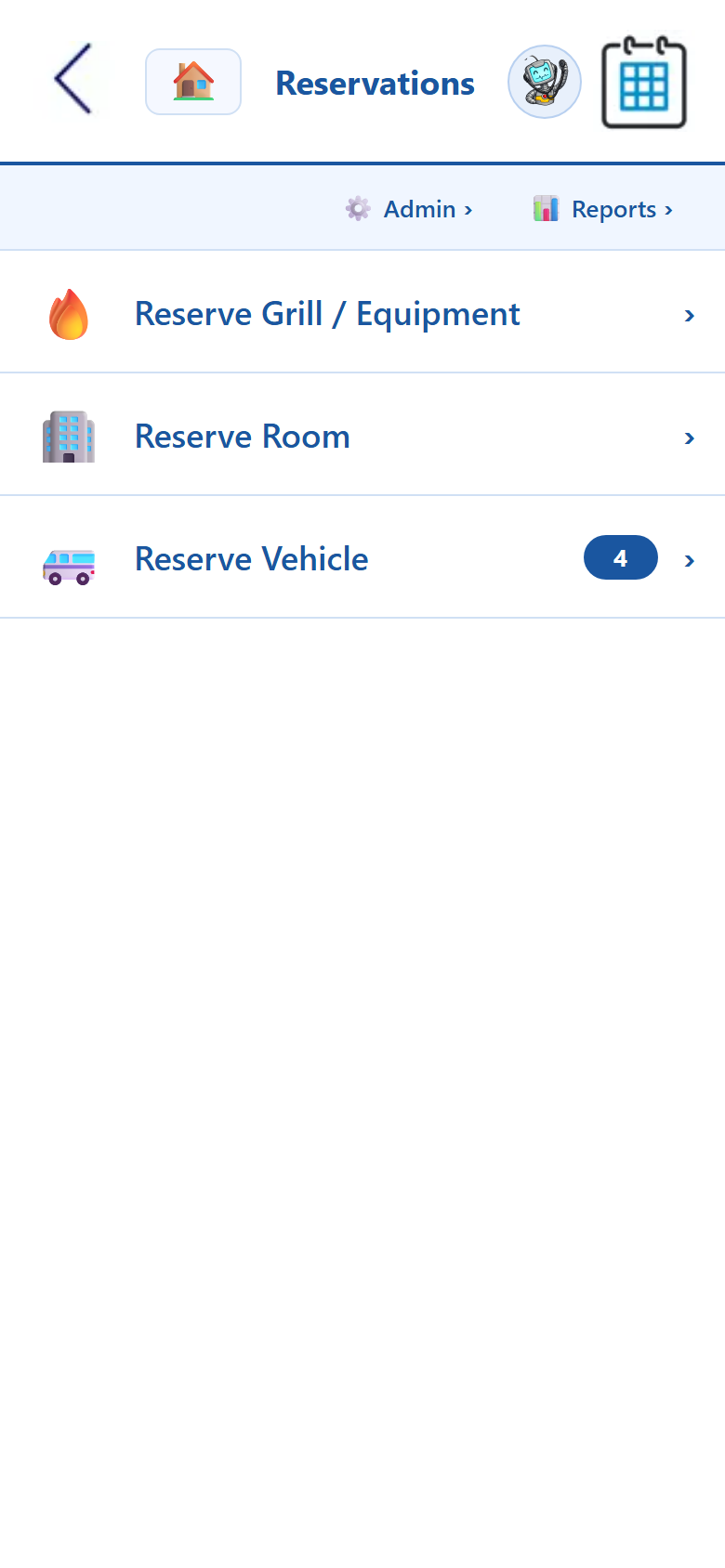
This is the reservation system on day one.
A real screen from the live app — reserve a room, reserve a vehicle, or reserve shared equipment, with admin and reports one tap away.
Room & vehicle reservation software FAQ
How space booking, vehicle scheduling, conflict detection, and resident-linked bookings work in a skilled nursing or long-term care setting.
What is a room and vehicle reservation system for long-term care?
It’s one app that handles two kinds of booking your facility juggles every day: shared spaces and shared vehicles. On the space side it’s a facility room reservation system — conference rooms, activity rooms, the chapel, family visit rooms, the dining hall, and outdoor areas. On the transport side it’s nursing home vehicle scheduling — transport vans, wheelchair vans, and activity buses for resident appointments and outings. Both live on the same calendar with the same conflict checking, so staff stop double-booking and stop chasing paper sign-up sheets.
How does the system stop double-bookings?
Every room and vehicle sits on a shared calendar, and the reservation system checks availability the moment someone tries to book. If a space or van is already reserved for that window, it won’t let the second booking through — it flags the conflict instead. That single rule is what replaces the paper sign-up sheet on the activity-room door and the dry-erase board by the vans, so two activities are never promised the same chapel and two residents are never promised the same wheelchair van.
Can a reservation be tied to a specific resident?
Yes. A booking can be linked directly to the resident it’s for, so a transport run carries who’s riding, where they’re going, and why, and a family-visit room carries which resident the visit is for. That resident link gives transport and activities staff the context behind every reservation and keeps a clean record of who went where — useful for both day-to-day coordination and healthcare facility room management reporting.
How does vehicle check-out and check-in work?
When a driver takes a van for an appointment or outing, they check it out in the app; when they return, they check it back in with mileage and any notes. At any moment you can see which vehicles are out, who has them, and when they’re due back. Paired with the transport request queue, it turns transport scheduling for a nursing home into a tracked, accountable workflow instead of a clipboard hanging by the keys.
See the apps on your own phone.
Drop your details and we'll email you a link to the live demo. Click around on your own time — pricing is right here whenever you're ready to sign up.