Prove CMS §483.71 Compliance: Facility Assessment Automation for LTC
Prove CMS §483.71 Compliance: Facility Assessment Automation for LTC
Facility assessment automation centralizes inspection data, cuts assessment time, and produces audit-ready evidence tied directly to staffing and resident needs. It replaces spreadsheets and paper walkthroughs with mobile capture, photo evidence, and dashboards that map straight to what CMS expects under §483.71. The rest of this guide breaks down which features matter, how they satisfy surveyors, and how to roll this out without disrupting daily operations.
TL;DR:
- Automated assessment tools standardize data capture with mobile checklists, photo evidence tagging, offline mode, and automated deficiency alerts, improving consistency across inspections.
- They significantly reduce staff hours spent on report compilation and enable portfolio-level prioritization of repairs, shifting focus from reactive fixes to proactive maintenance planning.
- CMS regulations require assessments to evaluate resident acuity, involve stakeholders, and inform staffing decisions, all of which are easier to demonstrate with automated exports and timestamped reviews.
- Starting with a focused pilot on the most survey-critical deficiency category, such as life safety or infection control, enhances staff adoption and allows measurable improvements before broader rollout.
- Linking deficiency findings directly to work tickets and staffing impacts within mobile workflows ensures issues are addressed promptly and compliance documentation is easily available during surveys.
Table of Contents
- What Is Facility Assessment Automation and Which Features Actually Matter?
- What Business Outcomes Does Automation Actually Deliver?
- What Does CMS Require Under §483.71, and How Does Automation Help?
- How Do You Roll This Out Without Disrupting Daily Operations?
- How Mobile-First Tools Turn Assessments Into Action
- Where Facility Managers Should Focus First
- Put Automated Assessments to Work With MyLTCApps
- Where to Verify These Requirements
- Sources
- FAQ
What Is Facility Assessment Automation and Which Features Actually Matter?
A facility condition assessment (FCA) produces three things: a baseline of current building conditions, a prioritized list of deficiencies, and often a facility condition index that scores overall wear against replacement cost. Done on paper, that process eats weeks and produces inconsistent results depending on who walked the halls that day.
Automated facility evaluation tools solve this by standardizing how data gets captured in the first place. The strongest platforms typically include:
- Mobile-first checklists that guide inspectors through the same sequence every time, on any personal device.
- Photo evidence tagging that timestamps and geotags conditions so deficiency claims hold up under review.
- Offline mode for basements, mechanical rooms, and other dead zones where connectivity drops.
- Automated deficiency tagging that flags urgency levels based on photo and note content rather than relying on memory.
- Dashboards and export formats that turn raw findings into surveyor-ready reports without a rebuild in Excel.
Standardization is the real payoff. When every inspector uses the same digital checklist, the resulting data can actually be compared across buildings, wings, or years, which is something paper forms rarely allow.
What Business Outcomes Does Automation Actually Deliver?
The time savings are real, but the bigger win is what happens after the walkthrough. Manual assessments require someone to retype notes, chase down photos, and rebuild reports by hand. Automated capture skips that entirely: the data is already structured the moment it’s logged.
Automation reshapes three outcomes facility leaders track most:
- Staff hours spent on report assembly drop sharply when data enters the system already tagged and formatted.
- Portfolio-level urgency scoring lets corporate teams rank repairs across every building instead of reacting site by site.
- Photo-verified audit trails give surveyors documented evidence instead of a manager’s recollection.
Industry analysts point out that automation and analytics let facility leaders prioritize capital at the portfolio level, ranking repairs by urgency so leadership plans ahead of failures rather than scrambling after a pipe bursts or an HVAC unit fails mid-summer. That shift, from reactive fixes to ranked capital planning, is what separates a compliance exercise from an actual maintenance strategy. It also means staffing conversations happen with evidence in hand instead of anecdotes, since a documented backlog of deficiencies makes the case for headcount or contractor budget far better than a verbal report at a board meeting.
What Does CMS Require Under §483.71, and How Does Automation Help?
The 2024 CMS guidance in QSO-24-13-NH rewired what a facility assessment needs to accomplish. It’s no longer a static document filed away after admission surveys. Facilities must evaluate their resident population, including acuity and diagnoses, involve stakeholders like nursing leadership and medical directors, and review the assessment at least annually or whenever a significant change occurs, such as a new service line or a spike in resident acuity.
42 CFR §483.71 goes further, requiring that the assessment directly inform staffing decisions, resource allocation, and contingency planning, not just describe the building.
Here’s how automation maps to each expectation:
- Resident population evaluation ties to structured acuity fields inside digital assessment forms, so changes get flagged rather than buried in narrative text.
- Stakeholder involvement shows up as digital sign-offs and comment threads tied to each review cycle.
- Annual or triggered reviews get scheduled automatically, with system reminders replacing a compliance officer’s calendar alert.
- Staffing influence links deficiency data to acuity buckets, so a surge in fall-risk findings connects to a documented staffing conversation.
Surveyors increasingly expect facilities to show, not just claim, that assessment findings shaped staffing and resource decisions. A dated PDF with a signature line doesn’t demonstrate that connection nearly as well as a system that logs who reviewed what and when.
Automated exports that timestamp every review and sign-off give surveyors exactly the paper trail they’re trained to look for.
How Do You Roll This Out Without Disrupting Daily Operations?
Start small. Pick one wing, one building, or one deficiency category, like life safety or infection control, and run it for a few months before expanding.
- Define the pilot scope and three KPIs before training a single staff member, such as time-to-close on flagged deficiencies, percentage of inspections completed on schedule, and audit-readiness score.
- Train frontline staff on the mobile workflow first, not the dashboard. Adoption depends on how easy the phone-based checklist feels, not how impressive the reporting looks to management.
- Connect assessment findings to your maintenance or work-ticket system so a flagged deficiency automatically spins up a ticket instead of sitting in a report nobody reopens.
- Review pilot results with leadership, then expand building by building rather than facility-wide overnight.
The most common pitfall is treating this as a compliance officer’s project rather than a frontline habit. If maintenance staff and nursing leadership never touch the tool, it becomes another spreadsheet with extra steps.
Pro Tip: Peer-reviewed research on adoption barriers found that embedding automated assessment steps into daily workflows, not the software’s features themselves, determines whether staff actually use the system. Pick the lowest-friction entry point, usually a photo-verified checklist on a phone, before adding any advanced features.
How Mobile-First Tools Turn Assessments Into Action
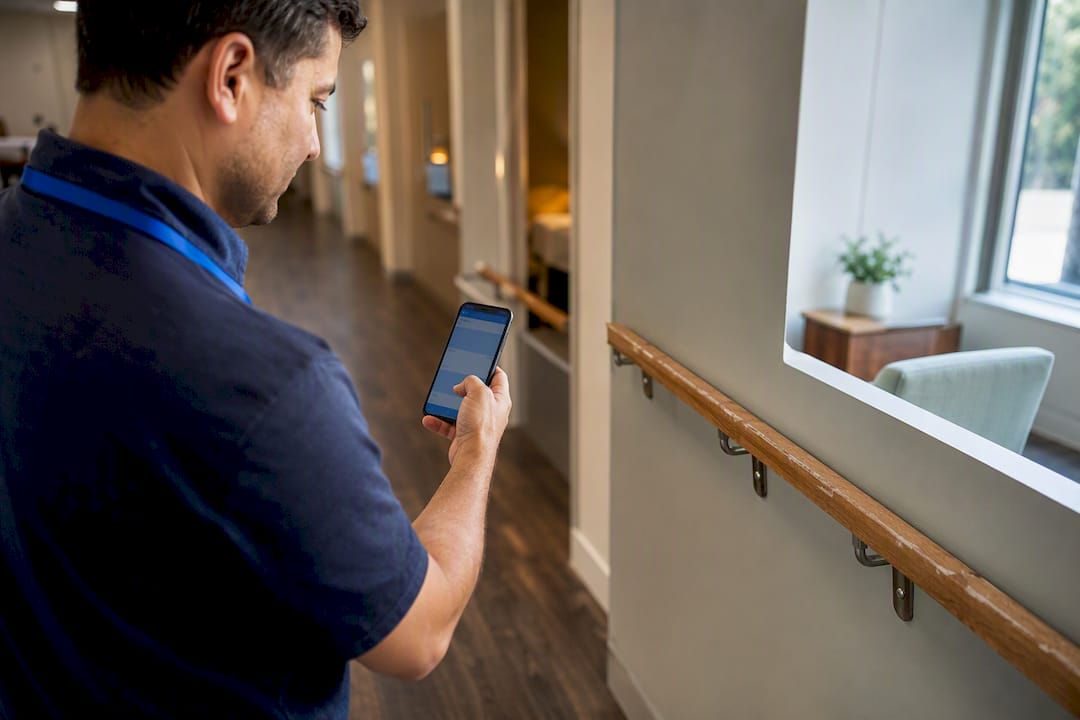
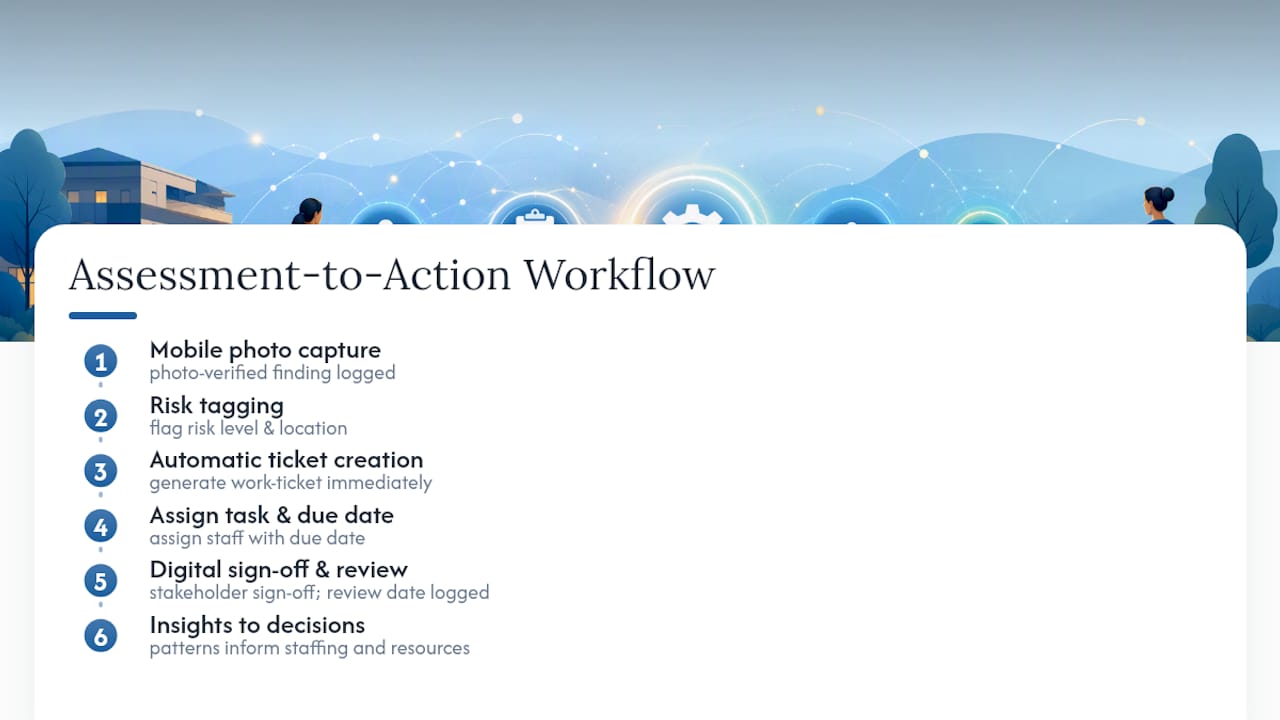
A photo-verified finding is only useful if it goes somewhere. Mobile checklists that flag a cracked handrail or a failing exhaust fan should generate a work ticket automatically, not wait for someone to transcribe it into a separate maintenance log days later.
That closed loop, from mobile capture to risk tagging to ticket creation, is exactly what platforms like MyLTCApps’ facility assessment tools are built to support, alongside work-ticket workflows that turn a flagged deficiency into an assigned task with a due date. That structure maps cleanly to CMS expectations: stakeholder sign-off happens digitally, review dates get logged automatically, and staffing implications become visible when deficiency patterns cluster around specific units or shifts.
Facilities piloting this kind of workflow should track key metrics such as time from finding to ticket closure, the proportion of deficiencies resolved before the next survey cycle, and the extent to which findings inform documented staffing or resource decisions. Detailed outcome data for specific facility types will vary, so treat early results as a baseline to refine, not a benchmark to hit on day one.
Where Facility Managers Should Focus First
If you’re starting an automation pilot, resist the urge to digitize everything at once. Pick the deficiency category that already causes the most survey anxiety, whether that’s life safety or infection control, and prove the workflow there first. Measure ticket closure time, survey readiness, and staff adoption over 90 days, and bring leadership into that review before expanding.
The piece people skip is tying findings to staffing. CMS doesn’t just want a list of broken things. It wants evidence that broken things changed staffing or resource decisions. Build that link early, or you’ll be retrofitting it under survey pressure later.
— Philip
Put Automated Assessments to Work With MyLTCApps
Myltcapps gives facility managers the mobile-first structure this article just described: photo-verified checklists, automated risk tagging, and work tickets that fire the moment a deficiency gets logged, all inside the same phone-based interface your staff already use for daily tasks. Compliance officers get exports built for surveyor review, without needing a separate reporting tool bolted on after the fact.

The platform doesn’t include medical charting. It’s built for operational and compliance workflows, including compliance task tracking, work-ticket management, and reporting, not clinical documentation. If your facility is still running assessments through spreadsheets and shared drives, a working pilot on one wing is the fastest way to see whether this structure fits. Visit MyLTCApps to see how facility assessment and work-ticket modules connect, or reach out to scope a pilot for your next review cycle. For teams weighing custom integrations beyond the standard modules, 121 Group’s AI automation consulting is worth a look for facility-specific workflow builds.
Where to Verify These Requirements
- QSO-24-13-NH: CMS’s revised facility assessment guidance.
- 42 CFR §483.71: the regulation text itself.
- Peer-reviewed adoption research: workflow adoption barriers.
- interRAI operational integration: standardized assessment instruments.
Sources
- QSO-24-13-NH: Revised guidance for long-term care facility assessment requirements
- 42 CFR § 483.71 - Facility assessment (LII)
- Peer-reviewed adoption insights (PMC)
- Data-driven decisions: How analytics are shaping healthcare facility planning
FAQ
What Is a Facility Condition Assessment?
A facility condition assessment evaluates a building’s physical condition, producing a baseline, a list of deficiencies, and often a facility condition index that compares repair costs to replacement value.
Does CMS Require Automated Facility Assessments?
CMS doesn’t mandate specific software, but 42 CFR §483.71 requires documented, evidence-based assessments that inform staffing and resource decisions, which automated tools make far easier to prove during a survey.
How Often Must Facilities Update Their Assessment?
Under QSO-24-13-NH, facilities must review their assessment annually and whenever a significant change occurs, such as a shift in resident acuity or a new service line.
Can Facility Assessment Software Replace Medical Charting?
No. Facility assessment and operations platforms, including Myltcapps, handle compliance tasks, maintenance tickets, and reporting; they are not medical charting systems.
What’s the Biggest Barrier to Adopting Assessment Automation?
Peer-reviewed research points to workflow adoption, not software features, as the primary barrier: staff need a low-friction way to log findings, usually mobile and photo-based, or the system goes unused.