Equipment Downtime Tracking for Long-Term Care Facilities

Equipment Downtime Tracking for Long-Term Care Facilities
Equipment downtime tracking is the systematic process of recording when equipment stops, for how long, and why. In long-term care facilities, that definition carries real weight. A malfunctioning HVAC unit, a broken lift, or a failed sterilizer does not just disrupt operations. It can directly compromise resident safety and trigger compliance violations.
The core distinction every facility manager needs to make is between planned downtime (scheduled maintenance, inspections, filter changes) and unplanned downtime (unexpected breakdowns). Mixing the two in your records obscures whether you have a maintenance planning problem or an equipment reliability problem. Those require entirely different responses.
Three KPIs form the backbone of any credible monitoring program:
- MTBF (Mean Time Between Failures): average operating time between unplanned stops; a declining trend signals a degrading asset
- MTTR (Mean Time To Repair): average time to restore equipment after failure; high MTTR often points to parts availability or technician skill gaps
- OEE (Overall Equipment Effectiveness): combines availability, performance, and quality into a single production performance metric
Automated, real-time tracking captures every stoppage, including the short micro-stops that manual logs routinely miss. When operators are focused on restarting equipment, paperwork is the last thing on their minds. Automated systems remove that dependency entirely and feed accurate data directly into maintenance workflows.
Essential metrics and best practices for tracking downtime effectively

1. Separate planned from unplanned downtime in every record
Planned stops (preventive maintenance, changeovers) and unplanned stops (breakdowns) need separate buckets from day one. Combining them inflates your apparent downtime and hides whether your preventive program is maturing or stalling.
2. Track MTBF trends by individual asset
A single MTBF number means little. What matters is the trend over time for each piece of equipment. A consistent decline on a specific lift or generator tells you exactly where to focus resources before the next failure.
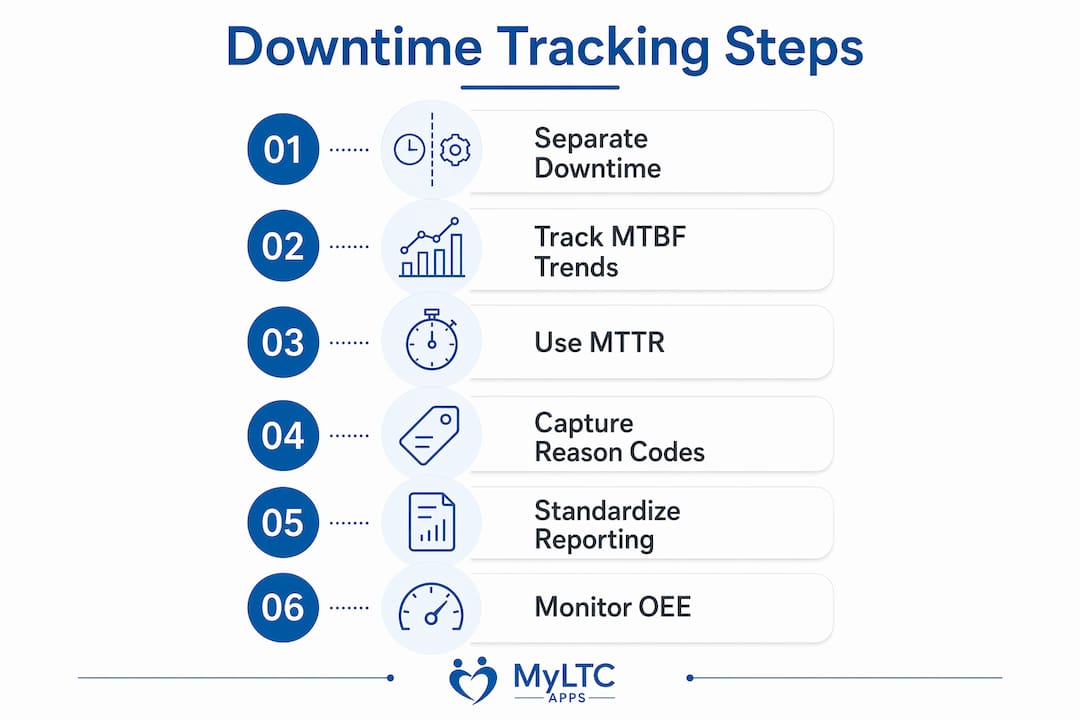
3. Use MTTR to diagnose your response system
High MTTR rarely means the fault was severe. More often it reflects a parts shortage, an unclear repair procedure, or a technician who was not notified quickly enough. Tracking MTTR by asset and by failure type surfaces those systemic gaps.
4. Capture downtime reason codes consistently
Reason codes like “awaiting parts,” “operator error,” or “electrical fault” transform raw stop-time data into diagnostic intelligence. Without them, you know how much time was lost but not why, which makes prioritization a guessing game.
5. Automate data collection wherever possible
Manual operator logs create gaps of uncertainty. Under pressure to restart equipment, staff underreport short stops and estimate durations inaccurately. Automated systems capture every event with a precise timestamp, giving you a baseline you can actually trust.
Downtime is typically the largest single source of lost production time. Implementing a CMMS with integrated maintenance tracking can reduce downtime, improve efficiency, and lower maintenance costs.
6. Standardize your reporting format across shifts
Inconsistent formats make cross-shift comparisons unreliable. A standardized digital form, completed at the machine, gives you comparable data whether the event happened on the day shift or overnight.
7. Monitor OEE to see the full picture
OEE ties availability, performance, and quality together. A facility running at high availability but low performance is still losing capacity. Tracking all three components reveals losses that a simple uptime percentage would hide.
How to bridge the gap between operations and maintenance
The most common failure in asset downtime management is not bad data. It is data that never reaches the people who can act on it.
Real-time dashboards change that dynamic. When a maintenance supervisor can see a stoppage as it happens rather than reading about it in a morning report, the response window shrinks from hours to minutes. Real-time visibility during a shift allows course corrections that simply are not possible after the fact.
Reason codes do double duty here. They help maintenance prioritize repairs, and they feed continuous improvement cycles by revealing which failure types recur most often. A code like “bearing wear” appearing repeatedly on the same asset is a clear signal to adjust the preventive maintenance schedule, not just repair and move on.
Closing the loop means connecting the data capture point to a work order. When a stoppage triggers an automatic work order, the maintenance team gets notified, the repair gets documented, and the follow-up gets tracked. That chain is what separates a monitoring system from a mere log.
Staff training matters just as much as the technology. A few practical steps:
- Introduce downtime reporting during onboarding, not as an afterthought
- Keep reason code lists short and clear at first; add categories as staff become comfortable
- Review downtime data in shift handoff meetings so the team sees why the data they enter actually matters
- Assign a point person per shift to verify entries are complete before the shift closes
Tracking downtime by shift also reveals patterns that have nothing to do with the equipment itself. If the same machine shows higher downtime on the evening shift, the issue may be a handoff gap or a staffing difference, not a mechanical fault.
How Myltcapps supports downtime tracking in long-term care
Myltcapps was built specifically for long-term care workflows, which puts it in a different category from generic maintenance platforms. The Work Order and Maintenance Ticket module lets staff submit maintenance requests from their personal devices, assign work orders digitally, and track task progress in real time without needing a desktop or a paper form.
The EVS Task Management module extends that visibility to housekeeping and environmental services, where equipment like floor scrubbers and laundry units often go untracked until something breaks. Capturing those assets in the same system gives facility managers a complete picture of operational health across departments.
Mobile accessibility is not a convenience feature here. It is the mechanism that makes consistent data entry realistic for care staff who are rarely at a desk. A few taps on a personal device to log a stoppage or submit a work ticket is a much lower barrier than finding a shared computer and navigating a complex interface.
Myltcapps also supports compliance tracking alongside maintenance management, which matters in Kansas facilities subject to KDADS oversight. Maintenance records and compliance documentation live in the same platform, reducing the risk of gaps during a survey.
Pro Tip: Start your reason code list with five to eight broad categories. Too many options upfront reduce data consistency and staff compliance. Refine the categories after 60 days once your team is comfortable with the habit.
What good downtime tracking looks like in practice
The facilities that get the most out of monitoring equipment downtime share a few habits. They differentiate planned from unplanned stops in every record. They track MTBF and MTTR by asset, not just facility-wide. They use automated capture so the data is complete, and they connect that data to work orders so repairs actually happen.
Key recommendations:
- Assign ownership of downtime data to a specific role, not a department in general
- Review MTBF trends monthly and adjust preventive maintenance schedules based on what you find
- Use MTTR to identify bottlenecks in your repair process, whether that is parts, staffing, or procedures
- Integrate your tracking system with your work order workflow so stoppages automatically generate maintenance tickets
- Choose a platform built for long-term care rather than adapting a manufacturing tool
Myltcapps gives Kansas long-term care facilities a practical path to all of the above without requiring a dedicated IT team to implement it.
Common causes of equipment downtime in long-term care facilities
Long-term care facilities face a specific set of failure patterns that differ from manufacturing or hospitality. Deferred preventive maintenance is the most common root cause. When staffing is tight and budgets are constrained, PM tasks get pushed back, and equipment that should have been serviced six months ago fails during a busy shift.
Age of assets is a close second. Many facilities operate equipment well past its expected service life, which compresses MTBF and inflates repair costs. Inadequate spare parts inventory compounds the problem: when a part is not on hand, MTTR climbs regardless of how quickly the technician diagnoses the fault.
Operator handling errors, particularly with lifts, dietary equipment, and laundry machinery, account for a meaningful share of unplanned stops. These are preventable with targeted training, but only if the tracking system captures “operator error” as a reason code so the pattern becomes visible.
How to implement an equipment downtime tracking system
- Build your asset register. List every piece of equipment by location, age, and criticality to resident care. Prioritize assets where a failure would affect safety or compliance first.
- Choose your capture method. Automated sensors provide the most accurate data. If budget limits sensor deployment, a mobile digital form is far more reliable than paper logs.
- Define your reason code list. Start with broad categories: mechanical failure, electrical fault, planned maintenance, operator issue, awaiting parts. Expand later.
- Connect stops to work orders. Every logged stoppage should trigger or link to a maintenance ticket. No ticket means no follow-up and no record of resolution.
- Set baseline KPIs. Record your starting MTBF and MTTR for each critical asset before making any changes. You cannot measure improvement without a baseline.
- Train staff before go-live. A 20-minute walkthrough at shift start is enough. Focus on why the data matters, not just how to enter it.
- Review and adjust monthly. Pull a Pareto chart of downtime by reason code each month. The top two or three categories are where your improvement effort belongs.
How to analyze downtime data to prioritize maintenance activities
Raw downtime minutes are a starting point, not a conclusion. The analysis step is where the data earns its keep.
Start with a Pareto chart ranked by total downtime per reason code. The categories at the top of that chart represent your highest-leverage opportunities. A bearing failure that accounts for a significant portion of your total lost time deserves a preventive maintenance response. A one-time power interruption does not.
Layer in MTBF trends by asset. An asset whose MTBF has dropped by half over six months is telling you something a single repair record would never reveal. Cross-reference that with MTTR: if the same asset also has high repair times, it is consuming a disproportionate share of your maintenance resources.
Shift-based analysis adds another dimension. If downtime on a specific asset spikes consistently on one shift, the cause may be a process or staffing issue rather than a mechanical one. That distinction changes the intervention entirely.
How downtime tracking integrates with maintenance management software
The most direct integration is the automatic work order trigger. When a stoppage is logged or a sensor detects a threshold breach, the system generates a maintenance ticket without waiting for a supervisor to notice. That single connection cuts response time and creates a documented chain from event to resolution.
A CMMS that shares a data foundation with your downtime tracking system also eliminates the manual reconciliation step. Maintenance costs, parts used, technician time, and downtime duration all live in one record, which makes cost-per-asset calculations accurate rather than estimated.
For Kansas long-term care facilities, integration with compliance reporting is equally important. A maintenance record that also satisfies a KDADS documentation requirement saves staff from entering the same information twice.
Examples of downtime tracking improving uptime in long-term care
A food processing facility that implemented a CMMS with integrated maintenance tracking reduced equipment downtime, increased production efficiency, and cut maintenance costs through fewer emergency repairs. The shift from reactive to scheduled maintenance was the primary driver.
In a multi-location restaurant environment, switching from paper-based maintenance tracking to a digital system cut repair time from several days down to just one, with urgent issues resolved much faster. The operational principle translates directly to long-term care: when maintenance requests are visible and tracked digitally, response times drop.
For long-term care facilities in Kansas, the parallel is clear. A lift that fails on a Friday afternoon and sits unrepaired through the weekend because no one logged the request is a safety risk and a compliance exposure. A digital work ticket submitted the moment the fault is noticed changes that outcome entirely.
Key Takeaways
Effective equipment downtime tracking in long-term care requires automated data capture, clear KPIs, and a direct connection between stoppage records and maintenance work orders.
| Point | Details |
|---|---|
| Separate downtime types | Track planned and unplanned stops in separate records to identify whether failures or maintenance gaps are the root cause. |
| Use MTBF, MTTR, and OEE | These three KPIs reveal asset reliability trends, repair bottlenecks, and overall production effectiveness. |
| Automate data capture | Automated systems eliminate the inaccuracies of manual logs and capture micro-stops that operators routinely miss. |
| Connect stops to work orders | Every logged stoppage should link to a maintenance ticket so repairs are tracked from event to resolution. |
| Start simple with reason codes | Begin with five to eight broad categories and refine over time to maintain data quality and staff compliance. |