Caregiver Mobile Checklists: 30–90 Day Pilot Plan for Administrators
Caregiver Mobile Checklists: 30–90 Day Pilot Plan for Administrators
Adopt phone-first caregiver mobile checklists to replace paper task lists, and start with a single-shift pilot before facility-wide rollout. Caregiver mobile checklists give staff assigned tasks, timestamps, and compliance items on their own phones, and a short pilot lets you confirm Wi-Fi coverage, staff buy-in, and survey-ready exports before you commit budget. There are platforms built specifically for this use case in long-term care.
TL;DR:
- Conduct a Wi-Fi quality assessment and ensure staff are adequately trained before implementing caregiver mobile checklists to prevent adoption delays.
- Prioritize vendors offering offline functionality, real-time Wi-Fi outage testing, and easy task reassignment features to improve reliability and ease of use.
- Use a phased rollout over 90 to 120 days, starting with a single shift or unit and expanding gradually to reduce disruption and gather actionable feedback.
- Track adoption rates, task completion times, and compliance improvements during a 30 to 90 day pilot to evaluate ROI and readiness for facility-wide adoption.
- Verify vendor support, data retention policies, and customization options upfront to ensure regulatory compliance and effective survey record keeping.
Table of Contents
- What Caregiver Mobile Checklists Do and What to Realistically Expect
- Core Features to Evaluate: An Administrator’s Checklist
- Implementation Best Practices to Reduce Rollout Risk
- How Mobile Checklists Support Regulatory Readiness and Surveying
- Metrics and ROI Signals to Track During a 30 to 90 Day Pilot
- Planning the Rollout Timeline With Milestones and Resource Allocation
- Administrator Perspective: Trade-Offs and a Quick Procurement Checklist
- Where certain platforms fit into your evaluation checklist
- Sources
What Caregiver Mobile Checklists Do and What to Realistically Expect
Caregiver mobile checklists are phone-first tools that assign tasks to specific staff members, log the exact time and location a task gets completed, and pre-load compliance items so nothing gets skipped during a busy shift, as explained in a nursing skills checklist turns ability into proof guide. This is a distinct category from the printable duty lists family caregivers use at home. It’s built for staff accountability, not personal reminders.
The upside is real: task completion becomes consistent because the app won’t let a shift close with items unchecked, timestamps create a defensible record for survey prep, and supervisors can spot a stalled task and intervene before it becomes a citation. But administrators should walk in with clear eyes about the friction points too.
• Staff need real training time before they’re faster on a phone than they were on paper. • Wi-Fi dead zones in older buildings can stall syncing at exactly the wrong moment. • Expect a transition window where some units double-document on paper and app until confidence builds.
None of that is a reason to skip mobile checklists. It’s a reason to pilot them deliberately instead of flipping the switch facility-wide on day one.
Core Features to Evaluate: An Administrator’s Checklist
Every vendor demo will look polished. The features below are what actually separate a checklist tool that survives contact with a busy med cart from one that gets abandoned within a month.
- Task and assignment controls. Look for reassignment on the fly, escalation when a task goes overdue, configurable due windows, and digital signatures with hard timestamps.
- Seeded compliance libraries. Ask whether HIPAA, Section 1557, dietary, QAPI, and emergency preparedness checklist templates come pre-built, or whether your team has to construct them from scratch.
- Offline resilience. A caregiver mobile checklist that fails the moment Wi-Fi drops is a paper checklist with extra steps. Confirm offline caching and queued sync.
- Minimal-tap design. If completing a routine check takes more than a few taps, staff working a double shift will find a workaround.
- Operational integration. Checklists should connect to work order and maintenance tickets, shift reports, and competency tracking, not sit as an isolated app.
- Administration controls. Role-based access, configurable dashboards, and template editing without a support ticket for every small change.
- Support model. Confirm what happens at 2 a.m. on a Saturday when a checklist won’t sync during med pass.
Pro Tip: During the demo, ask the vendor to simulate a Wi-Fi outage in real time. Watch exactly how the app surfaces unsynced tasks once connectivity returns. This single test tells you more about reliability than any feature slide.
Facilities with strong information technology use tend to score better on inspections even after controlling for staffing levels, according to a national survey of nursing home IT sophistication. That’s a strong argument for treating this checklist evaluation as a compliance investment, not just a convenience upgrade.
Housekeeping and environmental services teams have their own rhythm, and a housekeeping checklist built for nursing home managers illustrates how EVS tasks fit into the same mobile framework as clinical checks.
Implementation Best Practices to Reduce Rollout Risk
Software rarely fails on features. It fails on rollout. Nursing home health information technology projects commonly stumble because facilities underinvest in infrastructure, training, and technical support before go-live, not because the software itself was wrong for the job.
Start with a Wi-Fi and device readiness audit. Walk every hallway, medication room, and dining area with a signal meter before you sign a contract, and fix dead zones ahead of go-live rather than discovering them mid-shift.
Treat adoption as a change-management project, not a software install. Doctoral research on mobile healthcare implementation found that leadership support and staff engagement predict success more reliably than the feature list does. That means involving frontline caregivers in configuration decisions early, not just announcing the new app at a staff meeting.
- Appoint two to three super users per facility with dedicated time for training and troubleshooting.
- Roll out unit by unit or shift by shift instead of facility-wide overnight.
- Schedule extra coverage during the first two weeks of any new unit’s adoption.
- Run training on the actual screens staff will use, not a generic slide deck.
- Plan refresher training for every new hire, not just the original rollout group.
Research on nursing home HIT outcomes backs this up directly: implementations that included early stakeholder communication, added staffing during the transition, heavier training, incremental rollout, and on-site technical support were linked to fewer deficiency citations and better reported outcomes than rollouts that skipped those steps.
Pro Tip: Negotiate onboarding milestones into your contract, tied to pilot acceptance criteria and response-time commitments. A vendor willing to put support timelines in writing is telling you something about how they’ll behave after the invoice is paid.
How Mobile Checklists Support Regulatory Readiness and Surveying
Surveyors don’t want a narrative. They want a timestamped record showing who did what, when, and where, with evidence of correction when something went wrong. Caregiver mobile checklists generate that record automatically instead of relying on a nurse’s memory of a paper log from three weeks ago.
The data points that matter most during a survey:
- Signer identity tied to each completed task, not a shared login.
- Exact timestamps and, where relevant, location tags confirming the check happened where it was supposed to.
- Documented corrective action whenever a check fails or falls outside range.
- A clear retention policy so records are available for the lookback window surveyors expect.
Med refrigerator temperature logs, resident room safety checks, and in-service attendance sign-ins are among the items surveyors ask for most often, and digital logs make those records searchable instead of buried in a binder. Build your export templates and QA dashboards before the survey window, not during it, so a request for “the last 90 days of temperature logs” takes minutes instead of an afternoon.
Data handling still matters. Review any checklist vendor’s contract for how resident and staff data is stored and retained, and cross-check it against your own HIPAA compliance checklist before signing.
Metrics and ROI Signals to Track During a 30 to 90 Day Pilot
A pilot without measurement is just a longer demo. Set a baseline before go-live, then check in at 30, 60, and 90 days on three categories: adoption, operational time, and compliance trend.
Pro Tip: Multiple implementation reviews point to the same lesson: short pilots with clear, pre-set targets let administrators decide to scale or renegotiate with actual evidence, not gut feel.
Track percent of staff actively using the app per shift and overall checklist completion rate for adoption. Track time saved per checklist, average time to close a work ticket, and hours spent prepping for an audit for operational ROI. Track the trend in missed checks and any change in deficiency severity tied to checklist-covered topics for compliance outcomes. One case study of a UK care home group reported a 40% reduction in audit prep time after moving to digital checklists, though results like that vary by facility and shouldn’t be treated as a guarantee.
Planning the Rollout Timeline With Milestones and Resource Allocation
A realistic rollout runs 90 to 120 days from contract signature to facility-wide use, and trying to compress it usually backfires. Break it into four phases with named owners for each.
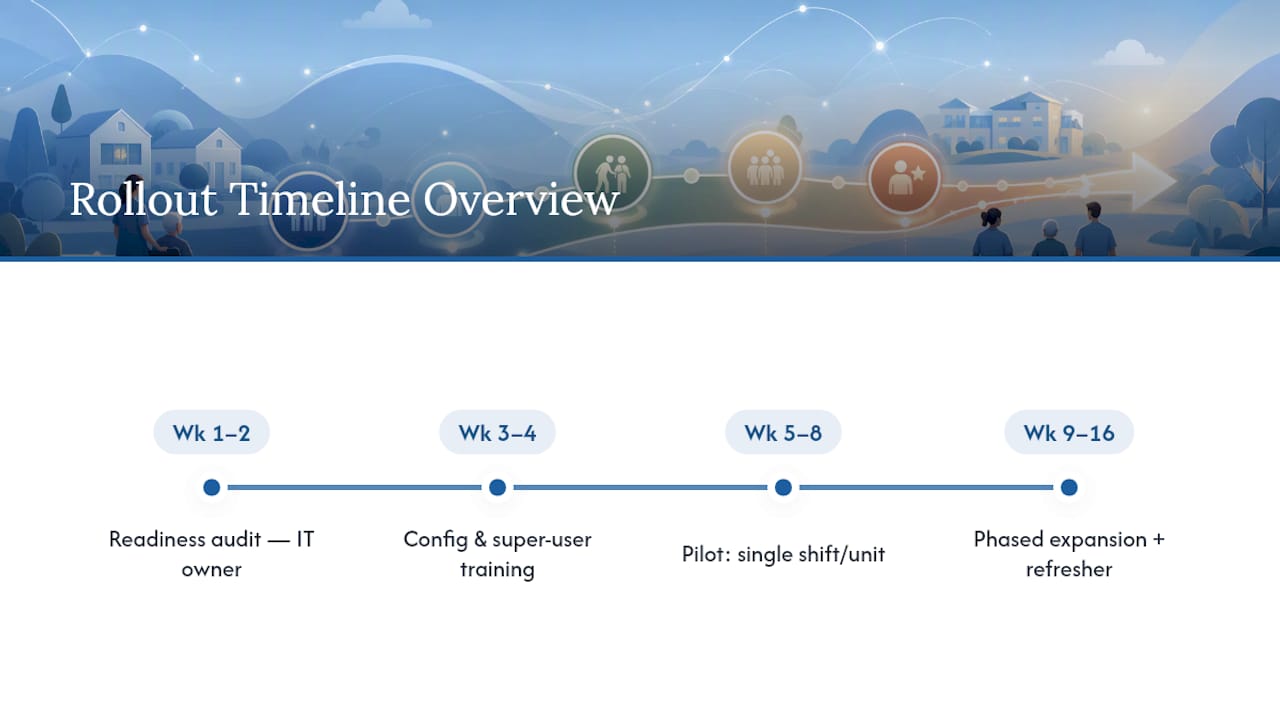
Weeks 1 to 2: readiness audit. Complete the Wi-Fi survey, inventory devices, and confirm which staff need new hardware versus using personal phones. Assign this to whoever owns IT or maintenance, not the administrator alone.
Weeks 3 to 4: configuration and super user training. Build out your compliance libraries, task templates, and role permissions with the vendor. Get your two or three super users trained on the actual production build, not a sandbox that looks different from what staff will see.
Weeks 5 to 8: single-shift or single-unit pilot. Launch with one shift or one unit, staff it a little heavier than normal, and collect daily feedback from super users. This is where you catch the workflow problems a demo never shows you.
Weeks 9 to 16: phased expansion. Add units or shifts on a schedule, not all at once, with a standing refresher-training slot for every new hire who joins after go-live.
Resource allocation matters as much as the calendar. Budget staff time for training, not just the software line item, and build super-user hours into the schedule so troubleshooting doesn’t quietly become unpaid overtime for your most capable staff. LeadingAge and other industry voices have been blunt about this: providers who wait for perfect staffing before starting are waiting too long, and mobile documentation tools have measurably cut nursing documentation time in reported deployments.
Administrator Perspective: Trade-Offs and a Quick Procurement Checklist
The honest trade-off with caregiver mobile checklists is speed to auditability against upfront training cost. You gain a defensible, timestamped record fast, but only after you absorb a few weeks of staff feeling slower than they were on paper. Any vendor who claims otherwise hasn’t run enough real rollouts.
Before you sign, ask every vendor these directly: What compliance libraries come pre-seeded, and can we edit them ourselves? How does the app behave during a Wi-Fi outage? What exactly does an export look like when a surveyor asks for 90 days of records? What’s your actual response time on a critical support ticket, in writing? And where are the customization limits, the things your sales rep won’t volunteer unless asked twice?
— Philip
Where certain platforms fit into your evaluation checklist
Some platforms are built around the features administrators are told to prioritize in this guide: mobile checklists with timestamped completion, seeded compliance libraries, work tickets, shift reports, and reporting exports designed for survey prep, accessible from a caregiver’s own phone with a few taps instead of a multi-step login.

Where a generic task app forces you to build every compliance template from scratch, some platforms start you with structures shaped for long-term care workflows, so your pilot tests real adoption instead of spending weeks on configuration. That difference matters most in the first 30 days, when staff patience for a clunky new tool is thin.
The practical next step is small on purpose. Run your Wi-Fi readiness audit this month, then request a demo focused specifically on the tasks and compliance checklist module rather than the full platform tour. Ask to see the offline sync behavior firsthand, and propose a single-shift pilot with your own 30/60/90 metrics attached before any facility-wide commitment gets discussed.
Sources
- Outcomes of health information technology utilization in nursing homes: Do implementation processes matter?
- Leadership and implementation challenges for mobile healthcare solutions (doctoral research)
- ‘We Need to Start Today’: Nursing Home Providers Strive to Implement Workforce Tech Amid Challenges - Skilled Nursing News