Cut Falls 34%: Call Light Response Time Targets for Nursing Leaders

Cut Falls 34%: Call Light Response Time Targets for Nursing Leaders
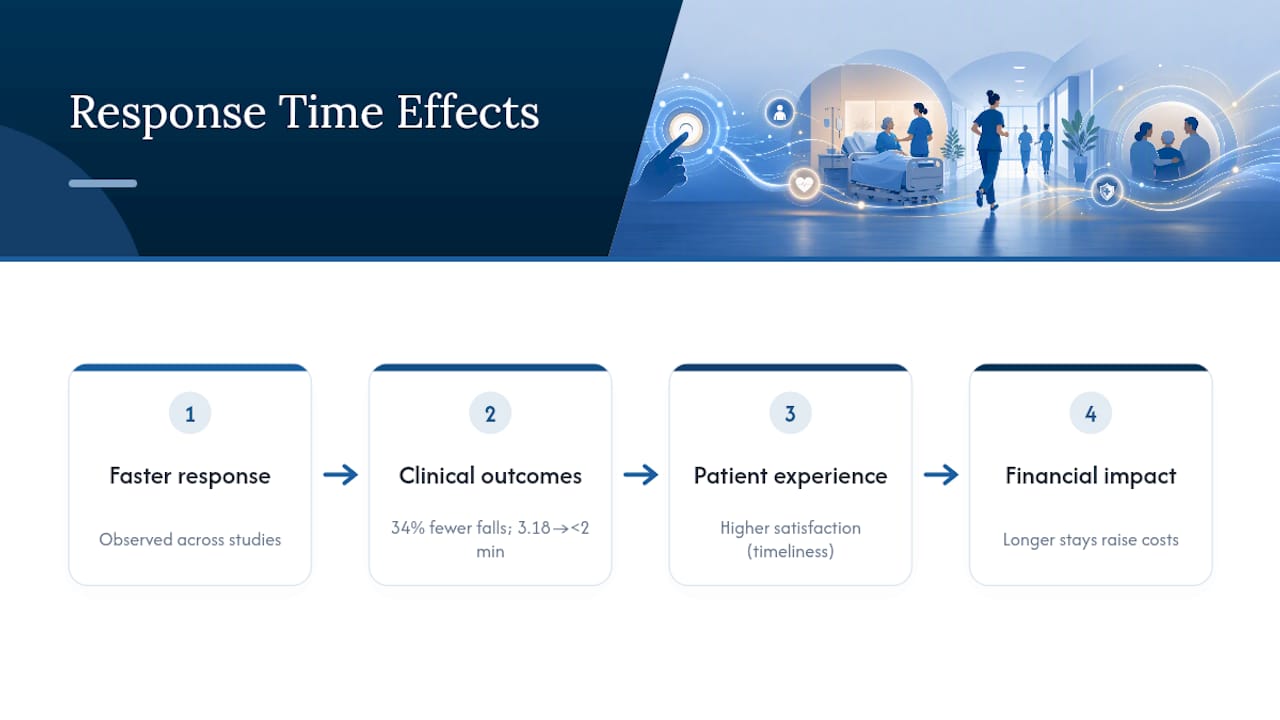
Aim for average call light response times under roughly two to three minutes. Multiple observational studies tie faster response to lower total and injurious fall rates and to higher patient satisfaction scores for timeliness. Hitting a reasonable target consistently requires a clear metric definition, a measurement system staff trust, and interventions that reduce call volume rather than just react faster to it.
TL;DR:
- Response time benchmarks vary by setting, with under 2 minutes for physical help being ideal, but staff must set realistic goals based on their own baseline data.
- Faster response times are linked to fewer falls and injurious incidents, with a 34% fall reduction observed after cutting response times from over 3 minutes to under 2 minutes.
- Accurate measurement relies on selecting a consistent endpoint, such as room entry, and normalizing data for call volume to compare units effectively.
- Workflow improvements like purposeful hourly rounding and clear call ownership have the strongest impact, whereas technology alone often fails without process changes.
- Successful pilots track a single metric over at least three months, involve staff recognition, and expand gradually while maintaining consistent definitions and reporting practices.
Table of Contents
- What Call Light Response Time Actually Measures
- The Evidence Linking Response Time to Falls and Patient Experience
- How to Measure Response Time Without Fooling Yourself
- What Actually Reduces Response Time
- Where Rollouts Go Wrong
- Real QI Projects and Their Numbers
- Your Pilot Checklist: From Baseline to Sustained Results
- Leadership Takeaways
- How MyLTCApps Supports a Call Light Improvement Pilot
- Sources
- FAQ
What Call Light Response Time Actually Measures
“Call light response time” sounds like one number. It isn’t. Depending on which study or vendor dashboard you’re reading, the clock can start and stop at three different points, and that choice changes the reported average by minutes, not seconds.
Activation to cancellation measures from the moment a patient presses the button to the moment someone at the nurse station or on a mobile device cancels the alert, often without anyone entering the room. Activation to answer captures the time until a staff member acknowledges the call, sometimes over an intercom. Activation to room entry tracks until a caregiver physically walks in, which is the interval that matters most for fall prevention since it reflects when hands-on help actually arrives.
This distinction is why two facilities can both report “great” response times while one is actually leaving patients waiting far longer for physical assistance. A unit that cancels calls remotely and logs a 90-second average may have a room-entry time closer to five minutes. When you compare your numbers against published benchmarks or against another facility, confirm which interval each source used. The AHRQ-supported exploratory study on response time and falls found meaningful variation in mean response times across four hospitals, partly because of how each site defined the endpoint.
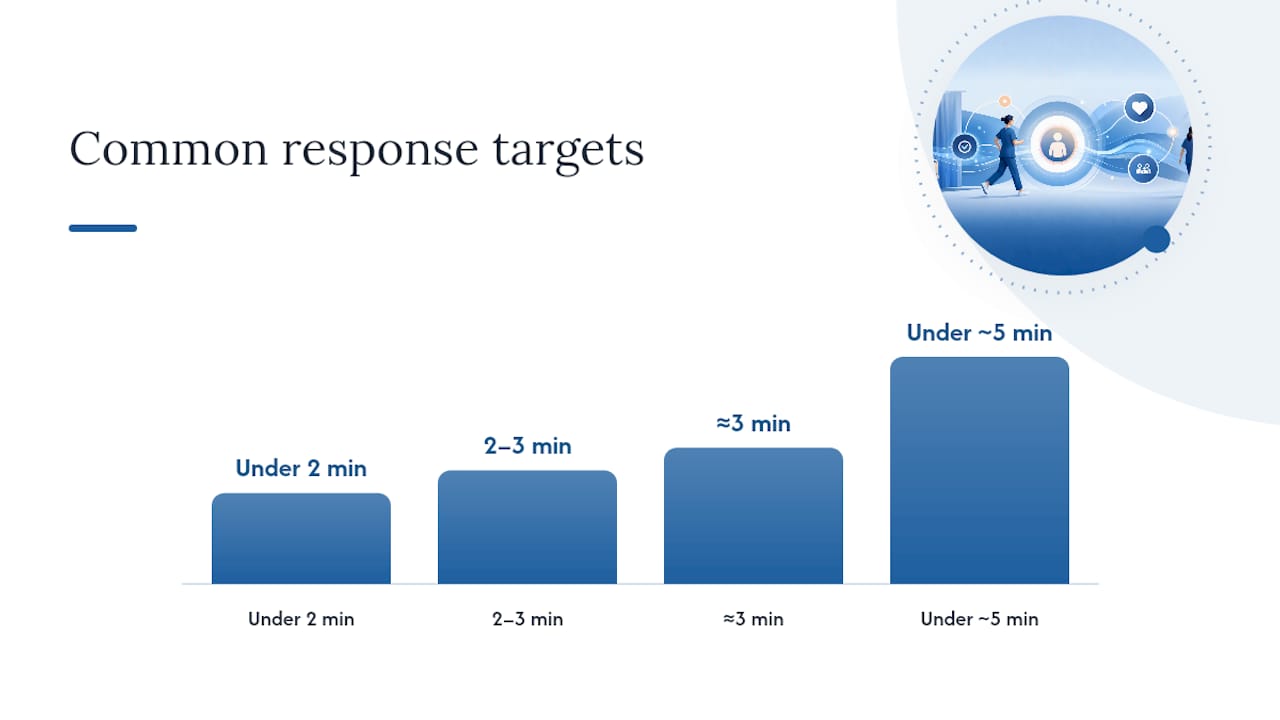
Common benchmark targets you’ll see cited in the literature and in quality improvement projects include:
- Under 2 minutes, the target used in several fall-reduction QI initiatives, including the project behind Strike the Light
- 2 to 3 minutes, a range that shows up frequently as an achievable, sustainable goal across medical-surgical units
- Approximately three minutes, sometimes cited as the longest patients and staff expect before a call feels ignored
- Under about five minutes, viewed in some audits as a threshold beyond which fall risk and dissatisfaction increase
None of these numbers is universal. A behavioral health unit, a post-surgical floor, and a long-term care facility all carry different call volumes and staffing ratios, so the target that fits your setting should come from your own baseline data, not a borrowed number.
The Evidence Linking Response Time to Falls and Patient Experience
The core finding across the research is consistent: units that answer call lights faster see fewer falls, and fewer of the falls that do happen cause injury. This isn’t a single study’s claim. It’s a pattern that shows up across observational research spanning different hospitals, time periods, and patient populations.
The most cited work in this space comes from an analysis of call light use, response time, and inpatient falls in acute care settings, which found an inverse relationship between staff response speed and both total falls and injurious falls. The AHRQ exploratory study by Tzeng and colleagues extended this by analyzing 1,063 unit-months across four hospitals, and found that faster average staff response time predicted lower total and injurious fall rates and correlated with higher patient satisfaction on timeliness measures.
Strike the Light, a clinical safety innovation project recognized by the American Association of Critical-Care Nurses, cut average call light response times from 3.18 minutes to under 2 minutes and recorded a 34% decrease in patient falls, along with a positive fiscal impact for the unit.
That single project connects the whole chain: a measurable process change, a specific time reduction, and a fall outcome big enough to matter on a budget line. It’s the clearest real-world proof point in this field, and it’s why so many QI teams model their own pilots on it.
The financial angle deserves its own mention. Falls extend hospital stays and drive up costs, and slower response times correlate with higher fall rates in observational data, according to analysis from Patient Guide Solutions. A single fall that lengthens a stay by several days, plus added care and liability exposure, can erase months of savings elsewhere in a budget. Administrators building a business case for staffing or technology investment should lean on this cost angle as much as the safety angle, since finance committees respond to both.
None of this proves that shaving 30 seconds off your average will single-handedly prevent a fall. These are observational, not randomized, studies, and unit-level factors like call volume, patient acuity, staffing ratios, and case mix all confound the relationship. A unit with a sicker patient population may show both slower response times and higher falls, without one directly causing the other in every instance. The honest read of this evidence: response time is one of the more actionable levers available, and consistently among the most reliable early indicators of unit-level risk, even if it isn’t the only variable at play. If you build a falls prevention program around this evidence, response time monitoring belongs alongside your existing falls prevention protocols, not as a replacement for them.
How to Measure Response Time Without Fooling Yourself
Getting a number is easy. Getting a number you can trust and act on is harder, and most facilities get at least one of the following details wrong on their first try.
- Pick one endpoint definition and stick to it. Decide whether your official metric is activation-to-cancellation, activation-to-answer, or activation-to-room-entry, and write it down. Room entry is the strongest choice for fall prevention because it reflects when physical help actually arrives, even though it’s harder to capture automatically than a button-press cancellation.
- Choose your data source deliberately. Nurse call system logs are the most objective source since they timestamp automatically, but they can miss context (a call canceled from the hallway isn’t the same as one answered at the bedside). Staff-entered cancellations are cheap to collect but prone to under-reporting delays. Direct observation audits are the most accurate for validating your electronic data but too labor-intensive to run continuously.
- Report more than the mean. An average can hide a real problem. Track median response time alongside the percentage of calls answered in under 2 minutes, and the percentage exceeding 5 minutes, since that tail is where fall risk concentrates.
- Set a reporting cadence and stick to it. Weekly dashboards for frontline charge nurses, monthly roll-ups for unit managers, and quarterly trend reports for administrators keep the data visible without drowning anyone in noise.
- Watch for volume distortion. A unit with a high admission and discharge turnover, or a longer average length of stay for acute patients, generates more calls independent of staffing quality, a pattern documented in call button responsiveness research. Normalize your metric by call volume per patient day before comparing units.
Audit data collected by The Beryl Institute shows just how wide the spread can be: some six-month audits report averages around 1 minute 43 seconds, while other hospital samples run past 5, even 17, minutes. That gap is rarely about staff effort. It’s usually about inconsistent definitions and incomplete data capture, which is exactly why step one on this list matters more than any technology purchase.
What Actually Reduces Response Time
Most facilities reach for technology first when response times are lagging. The evidence says that’s backward. The interventions with the strongest track record start with how staff work, not with what device they’re carrying.
Purposeful hourly rounding is the single highest-leverage change in this space, and it works by reducing calls before they happen rather than answering them faster. Toileting bundles, in particular, address one of the most common and most preventable reasons patients press the button. Programs built around structured rounding report fewer total calls and fewer calls exceeding five minutes, according to a multidisciplinary call button responsiveness program presented at a nursing research conference. A well-designed rounding checklist turns this from a vague expectation into a repeatable routine that staff can actually follow on a busy shift.
Bundled QI interventions tend to outperform any single tactic in isolation. Recognition and low-cost rewards were central to that project’s success, and QI teams consistently underestimate how much a simple “you hit the target” acknowledgment moves staff behavior compared to a policy memo.
Technology has a role, but it’s a supporting one. Two-way audio, call categorization (urgent versus routine), and mobile notifications can shorten the interval between a call and a response, but only when paired with clear ownership of who answers what. A study evaluating a high-tech call system found that patient satisfaction and staff perception often didn’t improve after a technology upgrade unless it came with workflow and culture changes. A shiny notification system layered onto a confused workflow just creates a faster way to be ignored.
The sequencing that works best in practice:
- Fix role clarity first: who answers calls on this unit, during this shift, for this patient assignment
- Add purposeful rounding to cut volume before you worry about answer speed
- Introduce recognition and visible metrics so staff see the effort paying off
- Layer in technology (alerts, categorization, mobile routing) to support the workflow you’ve already built, not to substitute for it
Pro Tip: Run your rounding pilot for at least four weeks before adding any new technology. If you introduce both at once and response times improve, you won’t know which change actually drove it, and you’ll struggle to justify the technology spend later.
Where Rollouts Go Wrong
Technology alone rarely fixes a slow response time problem, and the reason is almost always the same: staff experience the new system as noise, not help. A notification that fires every time any patient on the floor presses a button, routed to every device regardless of assignment, trains people to tune it out within a week.
Survey research on staff attitudes backs this up directly. Most nurses do see call lights as meaningful, with roughly 81.6% agreeing they matter, but a striking 44% report that answering call lights interrupts other critical work. That tension, wanting to respond but feeling pulled away from something else urgent, is the root of most rollout failures. If your response-time initiative doesn’t address that conflict directly, staff will quietly work around whatever system you install.
Infrastructure problems compound the issue. Weak Wi-Fi coverage in older wings, alert fatigue from poorly tuned notification thresholds, and unclear ownership when a call routes to a shared device instead of a specific caregiver all show up repeatedly in post-implementation reviews. None of these are exotic problems, and none require a big budget to fix, but they get missed when leadership treats the rollout as a technology install rather than a workflow change.
What tends to work: pilot on one or two units first and ask staff what’s actually breaking before you scale. Pair any new alert system with a workflow decision about who owns each call type. Keep reporting transparent, sharing both wins and setbacks with the floor staff who generated the data, and make sure recognition for hitting targets is visible and immediate rather than buried in a monthly memo nobody reads.
Real QI Projects and Their Numbers
The strongest argument for taking this seriously isn’t theoretical. It’s the small number of published projects that measured before and after and showed their math.
- Strike the Light reduced average response time from 3.18 minutes to under 2 minutes, recorded a 34% decrease in patient falls, and reported an estimated annual fiscal impact of $53,552 for the unit that ran it.
- Audit data compiled by The Beryl Institute documented six-month periods where units achieved average response times of about 1 minute 43 seconds, a useful reference point for what’s achievable with sustained attention, though it came from a different unit context than Strike the Light and shouldn’t be read as a universal benchmark.
- The BOLO (Be on the Lookout) program tied its improvements to reduced total call volume and fewer calls exceeding five minutes, tracking both metrics alongside patient satisfaction scores over the pilot period.
What these projects share matters more than their individual numbers: each one picked a single clear metric, tracked it consistently over a defined period (often three to six months), and paired the measurement with a specific behavioral or workflow change rather than a vague “let’s be faster” directive. That combination, one metric, one defined window, one concrete intervention, is the template worth copying, regardless of which exact number your unit lands on.
Your Pilot Checklist: From Baseline to Sustained Results
Every successful project in this space follows roughly the same three-phase arc. Skipping the first phase to jump straight to a technology purchase is the most common reason pilots stall.
- Run a baseline audit before changing anything. Define your metric (activation to room entry is strongest), pick a sample period of at least two to four weeks, and assign one person as the dashboard owner accountable for keeping the data clean.
- Design a focused pilot, not a hospital-wide rollout. Select one or two units, choose two or three bundle elements (rounding, role clarity, a recognition mechanism), assign specific staff roles for who owns which call type, and set a fixed duration, typically 8 to 12 weeks, with a defined metric you’ll report at the end.
- Build in a recognition mechanism from day one. Low-cost rewards and visible progress tracking were central to Strike the Light’s results, and skipping this step is the fastest way to lose staff buy-in halfway through.
- Report weekly during the pilot, then monthly once stable. Share both the metric and the story behind it with frontline staff, not just with leadership.
- Scale only after the pilot proves the metric moved. Once you extend to additional units, keep the same definition and reporting cadence you validated in the pilot; changing the metric mid-scale makes your own historical data useless for comparison.
- Integrate alerts and task tracking to support accountability, not replace it. A work ticket system that logs who was assigned a request and when it closed gives you a paper trail for follow-up without adding another layer of manual reporting for staff.
Leadership Takeaways
The biggest mistake I see in this space is treating response time as a discipline problem when it’s almost always a design problem. Staff aren’t ignoring call lights because they don’t care; they’re triaging six urgent things at once with a workflow that was never built to handle the volume.
Measure the metric, yes, but pair every dashboard with a genuine question to the floor: what’s making this hard right now? Pilot small, celebrate the wins loudly, and share the numbers with the people who generated them. Blame doesn’t move a response-time average. Better design does.
— Philip
How MyLTCApps Supports a Call Light Improvement Pilot
Myltcapps gives administrators one phone-first place to run the operational side of a response-time pilot, instead of stitching together spreadsheets, paper logs, and a separate notification tool. The Alerts & SMS module routes urgent notifications to the right staff member’s device in a few taps, so a call flagged as high-priority doesn’t sit in a queue nobody’s watching.

During a pilot, that same mobile-first design supports the workflow changes this article walks through. My Work Tickets lets you assign and close out requests that originate from call lights, so you get a record of who responded and when, without adding a manual reporting burden to an already busy shift. Shift Scheduling keeps staffing assignments visible, which matters when role clarity is the first fix on your list. And the operational dashboards give unit managers a single view of tasks, tickets, and alerts instead of jumping between systems to piece the picture together.
The platform is designed with mobile accessibility to support caregivers managing multiple tasks with minimal taps on their personal devices. Facilities can start with the I Just Want That plan at $199 per month or scale up through the Growth Pack or Premium Pack as a pilot expands. Check current pricing and features to see which package fits your unit’s pilot scope.
Sources
- Relationship between call light use and response time and inpatient falls in acute care settings
- Strike the Light — AACN clinical safety innovation project
- Exploratory study on call light response time and inpatient falls (AHRQ report)
FAQ
When Should You Respond to a Call Light?
Evidence-backed targets suggest aiming for under 2 to 3 minutes for physical room entry, since that’s the interval most closely tied to lower fall rates in observational research. Any call flagged urgent, such as a toileting request or reported pain, warrants an even faster response given the direct link to fall risk.
How Can You Improve Call Light Response Time?
The strongest results come from purposeful hourly rounding paired with clear role ownership and staff recognition, not from technology alone. The Strike the Light project combined these elements to cut response times from 3.18 minutes to under 2 minutes and reduce falls by 34%. Tools like Myltcapps can support the tracking and alerting side of that effort once the workflow changes are in place.
What Is the Hardest Unit to Work on as a Nurse?
There’s no single research-backed answer to this, since difficulty depends heavily on patient acuity, staffing ratios, and call volume rather than the unit type alone. Units with high admission and discharge turnover or longer average length of stay tend to generate higher call volume independent of staffing quality, according to call button responsiveness research, which can make response time targets harder to hit regardless of specialty.
Who Is Responsible for Responding to a Patient Call Bell?
Responsibility should be assigned explicitly during rounding and shift handoff, typically to the caregiver with the current patient assignment rather than whoever happens to be nearest a nurse station. Ambiguous ownership is one of the most common reasons response times slip, and survey data show that about 44% of nurses feel answering call lights interrupts other critical work, which makes clear assignment even more important during busy shifts.