90 Day Pilot Makes Healthcare Operations Dashboards Control Surfaces

90 Day Pilot Makes Healthcare Operations Dashboards Control Surfaces
An operations dashboard works because it surfaces exceptions, not averages: it tells a bed manager which discharge is stuck, a revenue cycle lead which claim just crossed a denial threshold, and a staffing coordinator which shift is uncovered in the next four hours. That exception-first design is what separates a dashboard people actually use from one that becomes a static report. When paired with clear ownership and a documented follow-up process, dashboards have been linked to shorter hospital stays and lower costs in a majority of published studies.
TL;DR:
- Dashboards should focus on real-time, exception-based metrics that directly trigger owner actions, rather than relying on general or vanity data points.
- Integration of data sources must be reliable, with clear definitions, timestamps, and role-based access control to maintain trust and security.
- Successful rollout requires phased pilots, action pathways attached to alerts, and dedicated governance roles to prevent threshold drift and dashboard abandonment.
- Predicted analytics and AI are useful for forecasting and anomaly detection but must clearly differentiate between real-time data and probabilistic forecasts to preserve trust.
- The ultimate value lies in dashboards functioning as control surfaces, translating exceptions into assigned tasks with evidence, not just static reports or visualizations.
Table of Contents
- What Is an Operations Dashboard in Healthcare?
- Which Operational KPIs and Metrics Actually Drive Decisions?
- What Design Principles Separate Dashboards People Use From Dashboards People Ignore?
- Where Does Dashboard Data Come From, and How Should You Integrate It?
- How Should You Roll Out and Govern an Operations Dashboard?
- What Does the Evidence Actually Show?
- How Do You Evaluate, Pilot, and Operationalize a Dashboard?
- How Long-Term Care Operators Close the Loop From Alert to Verified Task
- What About Data Privacy and Security in Operations Dashboards?
- Where Do Predictive Analytics and AI Fit Into an Operations Dashboard?
- Editorial Take: Dashboards Are Control Surfaces, Not Reports
- MyLTCApps: Built Around the Action Path, Not Just the Chart
- Sources
What Is an Operations Dashboard in Healthcare?
An operations dashboard is a live visual layer that pulls data from clinical, financial, and workforce systems and converts it into decisions someone has to make right now. It is not a report. A monthly report tells you what happened. A dashboard built around exceptions and action paths tells you what needs to happen next, and who is on the hook for it.
That distinction matters because most facilities already drown in reporting. What they lack is a single screen that separates the 40 licensed beds running fine from the three rooms with a discharge stuck behind a pending pharmacy order. An umbrella review of healthcare dashboards found that the strongest implementations classify tools by decision type first, then build the visuals around that decision, not the other way around.
Different roles need different slices of the same underlying data:
- Chief operating officers track census, throughput, and labor cost trends across the whole facility or system.
- Bed managers and unit coordinators need real-time occupancy, pending discharges, and turnover time by unit.
- Unit nurse leads care about staffing ratios, overdue tasks, and equipment availability on their floor, right now.
- Revenue cycle managers watch claims aging, denial patterns, and accounts receivable by payer.
The mistake many organizations make is building one dashboard and expecting every role to find it useful. An operational dashboard, a clinical quality dashboard, and a financial dashboard serve overlapping data but different questions. Operational dashboards answer “what needs attention today?” Clinical dashboards answer “how are outcomes trending?” Financial dashboards answer “where is money leaking?” Blending all three into one screen usually produces a dashboard nobody opens twice.
Which Operational KPIs and Metrics Actually Drive Decisions?
The metrics worth putting on a dashboard are the ones tied to a threshold and an owner. Everything else is decoration. Vanity metrics like total census or year-over-year admission counts look impressive in a board deck, but they rarely change what someone does at 10 a.m. on a Tuesday. Exception-based metrics do.
Here is a practical ranking of what belongs on an action-oriented operations dashboard:
- Compliance and license exceptions — items like licenses expiring within 30 days or overdue certifications, flagged before they become survey findings.
- Patient flow signals — ED door-to-provider time, discharge readiness by unit, bed turnover time, and average length of stay (ALOS) trends against a facility baseline.
- Workforce exceptions — open shifts within the next 24 to 48 hours, overtime accumulation by employee, and staffing ratios that fall below a set floor.
- Revenue cycle triggers — claims denied or pending over a dollar or day threshold, AR aging past 60 or 90 days, and payer-specific denial patterns.
- Asset and supply exceptions — equipment downtime past a repair window, and high-cost supply usage that deviates from expected volume.
Patient flow deserves particular attention because it touches almost every other metric on the list. A discharge delayed by six hours ripples into ED boarding, overtime for the covering shift, and a missed bed turnover target, all from one stalled process.
Pro Tip: Set thresholds based on your facility’s own baseline, not an industry benchmark pulled from a different setting. A denial rate that’s alarming for a 40-bed facility might be normal noise for a 200-bed system, and copying someone else’s threshold is the fastest way to train staff to ignore alerts.
Alert fatigue kills dashboard adoption faster than bad data does. If every metric fires a notification, staff learn to tune out all of them within a few weeks. The fix is deliberate: pick three to five driving metrics per role, document why each threshold was set where it was, and revisit those thresholds quarterly rather than letting them calcify.
What Design Principles Separate Dashboards People Use From Dashboards People Ignore?
Four pillars decide whether a dashboard becomes part of daily routine or gets bookmarked and forgotten: end-user engagement, data quality, usability and accessibility, and long-term governance. Practitioner guidance on building dashboards ops leaders will actually use converges on these same four factors, and skipping any one of them tends to sink the whole rollout.
- End-user engagement means the people who will stare at this screen daily helped design it, not just approve it after the fact.
- Data quality means the numbers match what staff already know to be true, or the dashboard loses credibility in week one.
- Usability and accessibility means the interface works on a phone in a hallway, not just a desktop in an office.
- Governance and ownership means someone is accountable for keeping definitions, thresholds, and access current.
Action-first design follows from those pillars. The best dashboards lead with exceptions, offer fast filters (“show me only overdue items”), give each role a saved preset view, and use progressive disclosure so a summary tile expands into detail only when someone clicks in. Nobody needs twelve charts on a landing screen. They need three answers and a path to drill deeper if something looks wrong.
Performance constraints matter more than most IT teams initially plan for. A dashboard that takes eight seconds to load on a facility Wi-Fi network will get abandoned within the first week, regardless of how good the underlying data is. Mobile responsiveness isn’t optional polish; it is the difference between a charge nurse checking the board between rounds and that same nurse waiting until end of shift, by which point the information is stale.
Rollout sequencing also shapes whether staff trust the tool. Facilities that succeed tend to start with outcome-focused dashboards that build credibility, add operational views once staff see the tool reflects reality, and only then layer in executive roll-ups. Facilities that launch all three tiers simultaneously often run into political resistance, because floor staff correctly sense that a leadership dashboard is being built on top of metrics they haven’t yet learned to trust.
Pro Tip: Run a two-week “shadow mode” before go-live, where the dashboard runs alongside existing paper or spreadsheet processes without replacing them. It surfaces data quality problems while the stakes are still low.
Where Does Dashboard Data Come From, and How Should You Integrate It?
Every functioning operations dashboard pulls from five or six source systems at minimum: the electronic health record for clinical and census data, the revenue cycle management system for claims and AR, the scheduling platform for shift and staffing data, payroll for labor cost, and asset or maintenance systems for equipment status. Supply chain systems round out the picture for facilities tracking high-cost consumables.
Integration comes down to a choice between two approaches; for example, clinician-facing solutions like MedScrub demonstrate how seamless workflow integration can reduce clinician adoption friction.
- Real-time API feeds pull data continuously, which is essential for anything time-sensitive like ED wait times or open shifts in the next few hours.
- Near-real-time ETL batches (extract, transform, load) refresh on a schedule, often hourly or nightly, which works fine for trend metrics like ALOS or monthly denial patterns but is too slow for anything requiring immediate action.
Mixing both within one dashboard is normal and usually correct. Put the API feed on exception triggers and the batch process on trend lines.
None of that works without canonical metric definitions. If the ED counts “door-to-provider time” differently than how the dashboard calculates it, staff will distrust every number on the screen, not just that one. Timestamp normalization across time zones and system clocks is a smaller, equally common failure point, especially in multi-site organizations. An audit trail that logs who changed a definition and when gives administrators something to point to when a number gets questioned during a survey or a board review.
Data governance around a healthcare operations dashboard also touches HIPAA and general data security obligations, and any question about what data can flow into a reporting layer versus what stays access-restricted belongs with your compliance officer or legal counsel, not guesswork at the department level. A facility’s HIPAA compliance checklist is a reasonable starting point for framing that conversation internally.
How Should You Roll Out and Govern an Operations Dashboard?
A 90-day pilot with a single audience beats a facility-wide launch every time. Pick one department, usually bed management or a single nursing unit, and define what success looks like before day one rather than after.
- Days 1 to 30: Deploy to the pilot group only. Track login frequency and whether staff open the dashboard without being reminded.
- Days 31 to 60: Measure whether exceptions flagged on the dashboard actually get resolved faster than they did before, using time-to-close as the metric.
- Days 61 to 90: Expand to a second department only after the first group hits its acceptance targets, and adjust thresholds based on what the pilot revealed.
The single biggest gap in most rollouts isn’t the visualization. It’s the missing action path. Every alert on the dashboard needs three things attached to it: a named owner, the evidence required to close it out, and an escalation gate if it sits unresolved past a set time. A systematic review of digital dashboards found that governance factors, metric ownership, review cadence, and change control, were repeatedly cited as decisive in whether dashboards produced measurable gains or just sat unused.
Pro Tip: Assign a data steward for every dashboard before launch, not after complaints start. That person owns metric definitions, fields questions about discrepancies, and approves any change to a threshold. Without that role, thresholds drift silently and nobody notices until the numbers stop making sense.
Governance cadence should be boring and regular: a monthly metric review where the steward and department leads confirm definitions still hold, and a change-control process for anyone who wants to add or modify a KPI. Skipping this step is the most common pitfall. Dashboards launched without a review cadence tend to accumulate outdated thresholds and abandoned metrics within six months, at which point staff stop trusting any of it. The remediation is straightforward but requires discipline: retire unused metrics quarterly, and never let a threshold change without documenting why.
What Does the Evidence Actually Show?
A 2025 systematic review covering 70 studies on hospital dashboard implementations found length-of-stay reductions reported in 28 of those findings, cost reductions in a majority of the economic analyses, and generally improved patient and caregiver satisfaction, when dashboards were implemented alongside complementary workflow changes rather than deployed as a standalone reporting layer.
Mortality effects were mixed across the review: five findings showed reductions in mortality, while most reported no measurable change at all.
That statistic callout matters because it tempers overpromising. Dashboards are not a mortality intervention on their own. They are a decision-support layer, and decision support only changes outcomes when someone acts on what it shows.
The limitations are worth stating plainly:
- Study designs varied widely, making direct comparison across facilities difficult.
- Many implementations happened alongside other organizational changes, like staffing model shifts or new discharge protocols, which confounds attribution of results to the dashboard alone.
- Local process measures, not just headline outcomes, are necessary to know whether a dashboard is working in your specific facility.
The practical takeaway for an administrator reading this evidence is not “install a dashboard and wait for LOS to drop.” It’s “install a dashboard, attach governance and workflow changes to it, and measure your own local process metrics before drawing conclusions.” An umbrella review covering multiple prior reviews backs this up, cataloging design features and challenges precisely because implementation quality, not the existence of a dashboard, tends to determine the outcome.
How Do You Evaluate, Pilot, and Operationalize a Dashboard?
A vendor demo will always look clean. What matters is whether the dashboard fits your decisions, your data, and your staff’s daily routine once the demo ends.
Run any candidate dashboard, whether built internally or bought, through this rubric:
- Decision fit — does it answer a question a specific role asks daily, or is it a generic reporting layer?
- Data readiness — do your source systems actually produce the fields this dashboard needs, at the frequency it needs them?
- Workflow closure — does an exception on the dashboard turn into an assigned task somewhere, or does it just sit as a red number?
- Governance capacity — is there a person who will own metric definitions and thresholds after launch?
- Performance — does it load fast enough on the devices staff actually carry?
For the pilot itself, track these markers across the 30/60/90 window:
- Login frequency without prompting (uptake)
- Average time between an exception appearing and someone acting on it (time-to-decision)
- Percentage of flagged tasks closed within the target window (tasks closed)
During any proof-of-concept with a vendor, push past the sales pitch and ask the questions that reveal whether the tool will hold up: How does the system handle a source feed going down mid-shift? Who owns metric definition changes after go-live? What does the mobile experience look like on a standard facility device, not a demo tablet? Answers that are vague on any of these three should be a red flag before signing anything.
How Long-Term Care Operators Close the Loop From Alert to Verified Task
A dashboard that flags a problem is only half the job. Long-term care operations run on shift reports, and a mobile daily shift report that feeds directly into a discharge-readiness signal turns a dashboard exception into an assigned task with a deadline, not just a colored tile someone glances at.
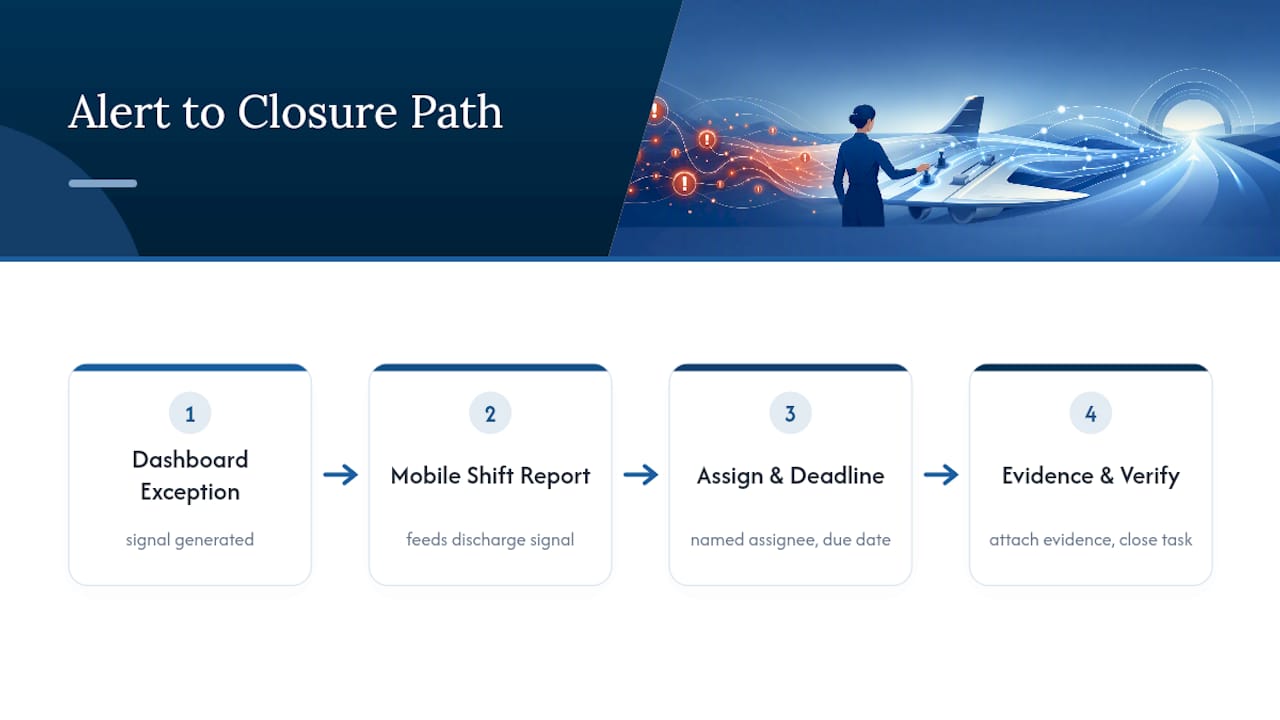
The same logic applies to equipment downtime tracking, cafeteria and payroll-deduct dining workflows, and staffing exceptions flagged through competency tracking. Each of these generates a signal worth putting on a dashboard, but the signal only produces a result when it routes to a named person with a required piece of evidence to close it out. That’s the action path in practice, not theory, inside a long-term care facility’s daily operations.
What About Data Privacy and Security in Operations Dashboards?
Operations dashboards aggregate data from multiple systems, which means they concentrate risk in ways individual source systems don’t. A dashboard pulling census counts, staffing levels, and claims status into one screen creates a single point that, if mishandled, exposes more than any one system alone would.
Access control has to be role-based, not facility-wide. A revenue cycle manager needs claims and AR detail; a unit nurse lead does not, and giving broader access than a role requires creates unnecessary exposure without adding operational value. Every login should be tied to an individual account, never a shared department credential, so that access and changes can be traced to a specific person.
Aggregated operational data, especially anything derived from resident-level records, still falls under the same general privacy obligations that govern the underlying systems. That means encryption in transit and at rest, documented data retention rules, and a clear line of accountability for who can export or share dashboard views outside the facility. Any specific question about what qualifies as protected information within a dashboard context, or how a particular integration should be architected to stay compliant, belongs with your facility’s compliance officer or legal counsel, not a vendor’s sales team.
Audit logging deserves its own line item. If a threshold or a metric definition changes, that change needs a timestamp and an owner attached to it, so a surveyor or an internal reviewer can trace exactly why a number looked different last quarter.
Where Do Predictive Analytics and AI Fit Into an Operations Dashboard?
Predictive layers are starting to show up on top of standard operational dashboards, most commonly for forecasting near-term census, flagging patients likely to need extended discharge planning, or predicting staffing shortfalls before a shift gap actually opens. The value proposition is straightforward: instead of reacting to an open shift six hours out, a facility gets a signal two or three days ahead based on historical patterns.
The risk is treating a prediction with the same confidence as a real-time count. A predicted discharge risk is a probability, not a fact, and dashboards that blur that distinction, presenting a forecast in the same visual weight as a live occupancy number, tend to erode trust the first time the prediction misses. The stronger implementations visually separate “what is happening now” from “what our model expects to happen,” and they let administrators see the confidence level behind a forecast rather than just a single number.
AI-driven anomaly detection is the more mature use case right now. Flagging a claims denial pattern that deviates from a facility’s historical norm, or catching an unusual spike in supply usage on one unit, is a narrower and more reliable application than trying to predict individual patient outcomes. For most administrators evaluating a dashboard today, anomaly detection on operational metrics is a safer place to start than clinical prediction, both from a trust standpoint and a validation standpoint.
Editorial Take: Dashboards Are Control Surfaces, Not Reports
The industry still talks about dashboards like they’re a reporting upgrade. They’re not. A dashboard that just replaces a monthly PDF with a live chart hasn’t changed anything about how decisions get made. The evidence backs a narrower, sharper claim: dashboards work when they function as control surfaces, where an exception fires, a person is named, and a task closes with evidence attached.
Where conventional advice falls short is in treating design and data integration as the hard part. They’re not. The hard part is governance, deciding who owns a threshold, who reviews it monthly, and who’s accountable when an alert gets ignored for three weeks. Facilities that skip that groundwork end up with a beautiful dashboard nobody trusts by month six.
If you’re prioritizing one thing first, prioritize the action path. Build the workflow that turns a red exception into an assigned task with proof of completion before you spend another dollar on visualization polish. A dashboard connected to mobile task assignment closes that loop in a way a static chart never will.
— Philip
MyLTCApps: Built Around the Action Path, Not Just the Chart
MyLTCApps is a phone-first alternative to juggling separate spreadsheets, paper checklists, and standalone reporting tools across your facility. Instead of a dashboard that only shows you a problem, it connects operational signals directly to assigned tasks, compliance tracking, shift reports, and reservation and dining workflows, so an exception can turn into closed work with evidence attached.

To be direct about scope: MyLTCApps does not include medical charting. What it does provide is task management, compliance tracking, maintenance and work ticket workflows, shift scheduling, cafeteria and payroll-deduct dining, asset tracking, and the operational dashboards that tie those pieces together for administrators managing long-term care and skilled nursing operations.
If your facility runs in Kansas, there’s a dedicated long-term care software option built for KDADS-ready facilities that maps directly onto state reporting expectations. For a broader look at how the full suite fits into daily long-term care operations, start with the LTPAC operations software overview and see which modules match the gaps this article just walked through.
Sources
- Umbrella review of healthcare dashboards: Applications, benefits, design, and challenges
- How to Build Dashboards That Ops Leaders Will Actually Use