Survey Ready Fire Drill Logs: U.S. LTC Templates, Paper vs Phone

Survey Ready Fire Drill Logs: U.S. LTC Templates, Paper vs Phone
A compliant fire drill log records the date, time, shift, location, notification method, facilitator, staff present, actions taken, problems identified, and corrective actions for every drill. Keep every one of those fields filled in for every drill, because surveyors use the log to verify two separate things: that the drill actually happened, and that your staff knew what to do when it did.
TL;DR:
- Fire drill logs must include detailed information for each drill, such as date, time, location, scenario, notification method, staff present, actions taken, problems encountered, and corrective actions with follow-up deadlines.
- All entries require signatures of the facilitator and the date of completion, with pre-drill documentation of date, shift, and location, and should be signed on the same day to avoid non-compliance.
- Facilities need to conduct at least one drill per shift each quarter, with the schedule rotating unpredictably to prevent staff from expecting drills on specific days or times.
- When using paper logs, consistent labeling, photocopying, and cross-referencing are essential; electronic platforms streamline documentation, timestamp entries, and generate compliance matrices automatically.
- Records should be retained for at least three years, organized in a matrix format to allow quick review of compliance across shifts and quarters, aiding surveyor reviews and internal audits.
Table of Contents
- What Fields Does a Fire Drill Log Need?
- How Often Should You Run Fire Drills?
- Sample Fire Drill Log Entries You Can Adapt
- Overnight Drills: Coded Announcements and Notification Rules
- What Surveyors Actually Check in a Fire Drill Log
- Retention Rules and Building a Drill Matrix
- Printable Templates vs. Mobile Compliance Tools
- What I’ve Learned Reviewing Facility Drill Records
- Simplify Fire Drill Documentation With a Phone-First Compliance Tool
- Sources
- FAQ
What Fields Does a Fire Drill Log Need?
Skip a field and you hand a surveyor an easy citation. The Joint Commission expects a drill matrix with specific columns, and AHCA/NCAL’s guidance on drill records lines up with it closely. Between the two, the minimum entry looks like this.
Required fields for every entry:
- Date and time (use 24-hour format: 1430, not 2:30 PM)
- Shift (day, evening, or night, labeled consistently every time)
- Location or building, including unit or wing
- Drill type or scenario (kitchen fire, hallway smoke, resident room, etc.)
- Notification method (audible alarm, visual device, or coded announcement)
- Facilitator name and title
- Staff on duty and staff who participated
- Actions taken, referencing RACE (Rescue, Alarm, Confine, Extinguish/Evacuate) or PASS (Pull, Aim, Squeeze, Sweep) where relevant
- Problems encountered
- Corrective actions assigned, with a name and a deadline
- Alarm-monitor verification (confirmation the monitoring company received the signal)
- Signature of the person completing the log
That last item gets skipped more than any other. An unsigned log looks unfinished even when everything else is filled in correctly.
How to build the entry, step by step:
- Fill in date, time, shift, and location before the drill starts, not after.
- Assign one facilitator who owns the drill from notification to wrap-up.
- Track attendance with a sign-in sheet, not a headcount from memory.
- Note the notification method used and confirm the alarm monitor logged it.
- Record what actually happened, including anything that went wrong.
- Write the corrective action with a name attached and a follow-up date.
- Sign and date the completed entry the same day.
For attendance, a short, repeatable format beats a long narrative. Initials, position, and time in and out are enough to answer a surveyor’s question without flipping through pages. That consistency also speeds up staff interviews, since employees can point to their own initials rather than trying to reconstruct who else was in the hallway that afternoon.
Label shifts the same way every time. If your facility runs day, evening, and night, use those exact words in the log rather than switching between “7 to 3” one month and “day shift” the next. A Life Safety Code checklist built around this kind of consistent labeling makes it far easier to spot gaps before a surveyor does.
How Often Should You Run Fire Drills?
The regulatory floor is one drill per shift per quarter. Most facilities meet that by running one drill a month on a rotating shift, so each shift picks up four drills a year rather than clustering them all in the same week.
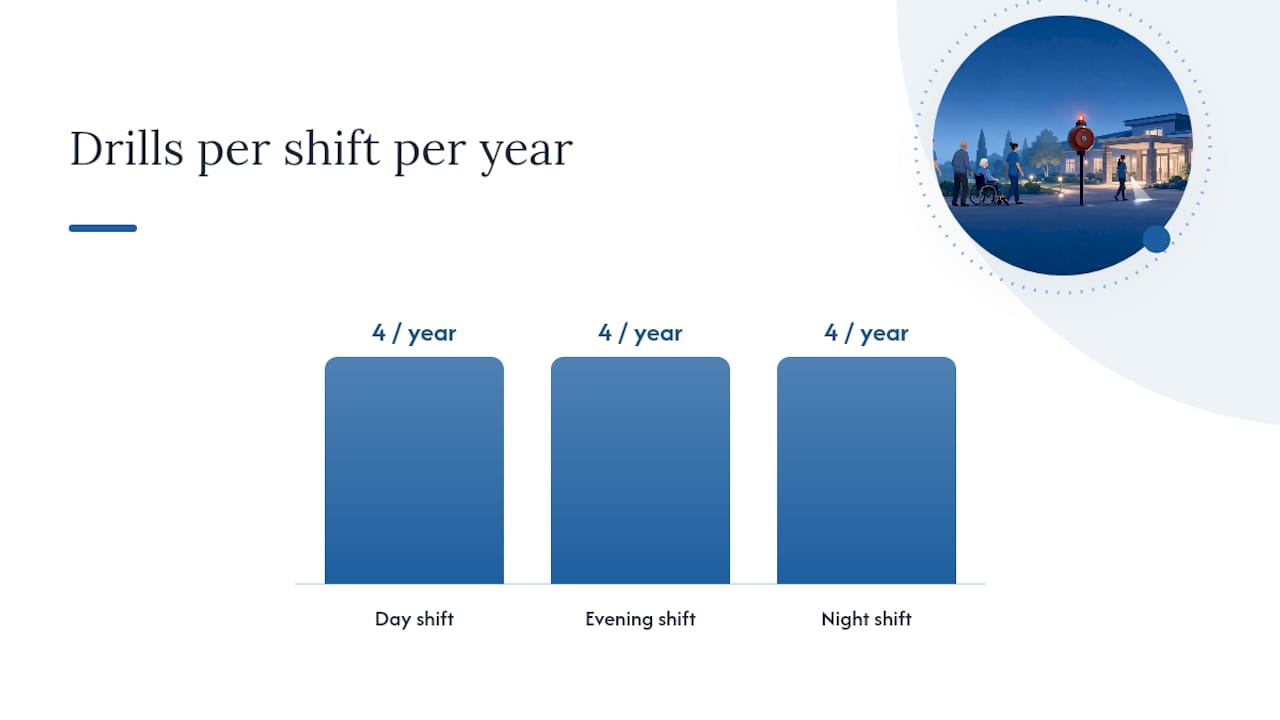
That baseline comes straight from AHCA/NCAL’s guidance on compliant fire drills, and it’s the number surveyors check first. Monthly rotation isn’t required by name, but it’s the practical way facilities hit “quarterly, every shift” without scrambling in the last week of March.
A basic rotation might look like this:
- Month 1: day shift drill
- Month 2: evening shift drill
- Month 3: night shift drill
- Repeat, shifting the starting point each quarter so the same shift doesn’t always go first
Predictability is the enemy here. If your night shift always gets drilled on the second Tuesday, staff start expecting it, and an expected drill doesn’t test real response. Vary the day of the week, the time within the shift window, and the scenario type. A kitchen fire drill in March and a hallway smoke drill in June test different muscles.
Joint Commission revisions in 2026 removed the old one-hour separation rule and the 10-day scheduling window that used to box facilities into narrow timing slots. The core requirements didn’t change. Drills still need to be unannounced and still need to vary in timing and conditions. What changed is the administrative burden of proving you hit an exact window, which gives facility managers more room to schedule drills when they’ll actually catch staff off guard instead of when a spreadsheet says they’re due.
Pro Tip: If your campus has mixed occupancy types (skilled nursing on one wing, assisted living on another), schedule drills separately for each occupancy classification. A single facility-wide drill can satisfy one occupancy’s quarterly requirement while leaving the other undocumented, and that gap shows up fast during a survey.
Multi-unit campuses need their own tracking lines in the matrix. Treat each occupancy type as its own quarterly cycle, even if the buildings share a wall.
Sample Fire Drill Log Entries You Can Adapt
Seeing a filled-in entry makes the field list above concrete. Here are four samples, ranging from strong to weak, so you can see exactly what separates a survey-ready log from one that invites questions.
Sample entry 1: Day shift, kitchen scenario
- Date/Time: March 4, 2026, 1015
- Shift: Day
- Location: Main kitchen, Building A
- Drill type: Simulated grease fire
- Notification: Audible alarm activated facility-wide
- Facilitator: J. Alvarez, Safety Coordinator
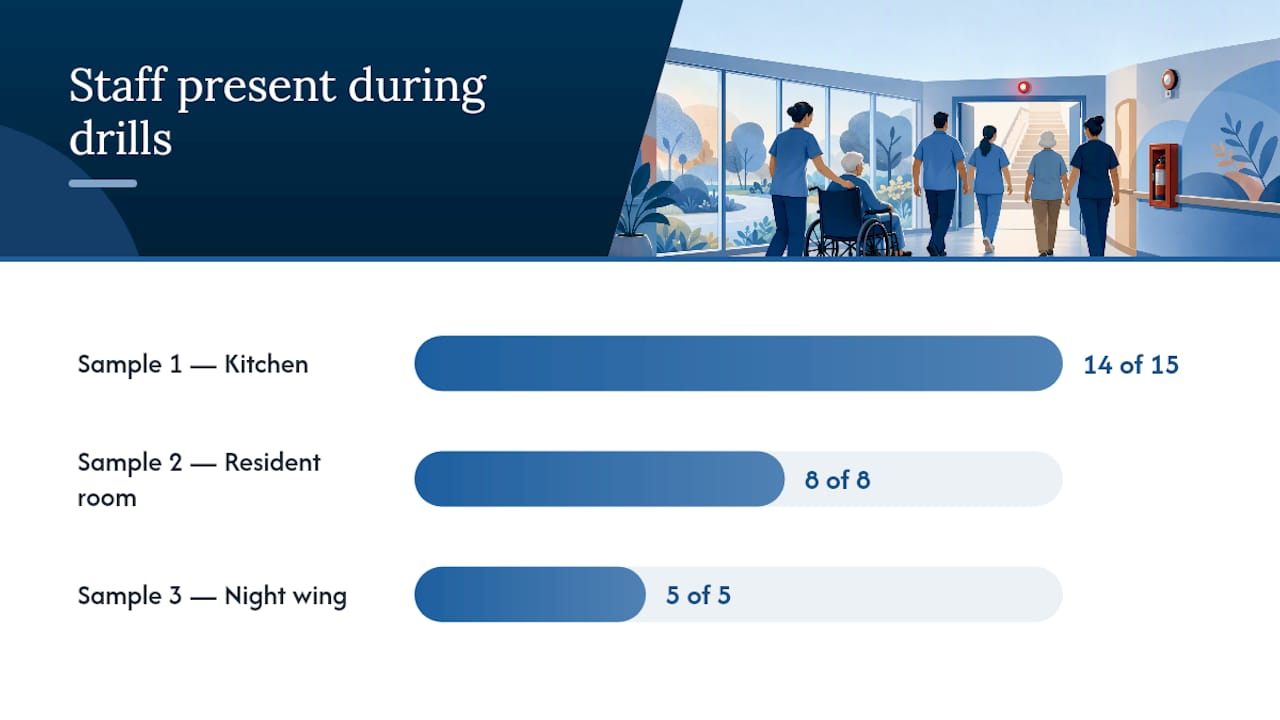
- Staff present: 14 of 15 scheduled staff (1 on approved leave, noted on sign-in sheet)
- Actions taken: Kitchen staff activated pull station, closed fire doors, began RACE sequence. Nursing staff on Wing B began horizontal evacuation drill of two rooms.
- Problems identified: One fire door in Wing B hallway did not latch fully on first close.
- Corrective action: Maintenance notified same day; door hardware inspected and adjusted by end of shift. Follow-up inspection logged March 5.
- Alarm-monitor verification: Confirmed by monitoring company at 1017, receipt on file.
- Signature: J. Alvarez, 3/4/2026
Sample entry 2: Evening shift, resident room scenario
- Date/Time: April 16, 2026, 1840
- Shift: Evening
- Location: Wing C, Room 214
- Drill type: Simulated oxygen tank fire
- Notification: Audible alarm, zone-specific
- Facilitator: T. Kim, Charge Nurse
- Staff present: 8 of 8 scheduled
- Actions taken: Staff shut off oxygen source, evacuated adjacent rooms, confined smoke by closing corridor doors.
- Problems identified: NA/NC (no problems identified, no corrective action needed)
- Corrective action: NA/NC
- Alarm-monitor verification: Confirmed at 1842
- Signature: T. Kim, 4/16/2026
The “NA/NC” convention (no problems identified, no corrective action needed) is worth adopting facility-wide. It reads as a deliberate confirmation that nothing went wrong, rather than a blank field that looks like someone forgot to fill it in.
Sample entry 3: Night shift, coded announcement
- Date/Time: May 9, 2026, 0230
- Shift: Night
- Location: Wing A, full wing
- Drill type: Hallway smoke condition
- Notification: Coded announcement over intercom (“Code Red, Wing A”) in place of audible alarm; visual strobes activated
- Facilitator: R. Patel, Night Supervisor
- Staff present: 5 of 5 scheduled
- Actions taken: Staff closed resident room doors, checked hallway for smoke source, prepared for evacuation, awaited all-clear.
- Problems identified: One staff member unclear on coded announcement meaning; delayed response by roughly 90 seconds.
- Corrective action: Retraining scheduled for that staff member within 5 days, completed May 13 and signed off by R. Patel.
- Alarm-monitor verification: Confirmed at 0232; full audible alarm test run at 0700 shift change per facility policy.
- Signature: R. Patel, 5/9/2026
Notice the difference between “retraining scheduled” and a vague promise to “review with staff.” Naming the person, the timeframe, and the follow-up signoff is what separates a corrective action surveyors accept from one they question.
Sample entry 4: Weak entry (what to avoid)
- Date/Time: 5/9
- Shift: Nights
- Location: —
- Notification: Alarm
- Facilitator: Supervisor
- Staff present: All staff
- Actions taken: Drill went fine
- Problems identified: None
- Corrective action: N/A
- Signature: (unsigned)
That fourth entry has every category filled in and still tells a surveyor nothing. No location, no specific method, no facilitator name, no evidence anyone actually did anything. It’s the kind of boilerplate that gets a facility flagged even when the drill genuinely happened as described.
Pro Tip: Write the “actions taken” line as if you’re describing the drill to someone who wasn’t there. If your sentence could apply to any drill on any day, rewrite it with specifics: which doors closed, which staff moved, what the facilitator observed.
Overnight Drills: Coded Announcements and Notification Rules
Night shift drills come with one meaningful exception: facilities can use a coded announcement instead of sounding the full audible alarm, typically within the 9:00 PM to 6:00 AM window. Residents sleeping shouldn’t be startled awake by a siren every quarter, and regulators built the coded-announcement option around that reality.
The exception has limits. Visual alarm devices still need to activate, and AHCA/NCAL’s guidance is clear that overnight staff must still demonstrate a full response, not a scaled-down version of one.
What to log for an overnight drill:
- The exact wording of the coded announcement used
- Confirmation that visual strobes or other devices activated
- Staff response actions, documented with the same detail as a daytime drill
- Alarm-monitor confirmation for the coded signal itself
- If your state or internal policy requires it, the time the full audible alarm was tested the next morning, along with that verification receipt kept in the same drill file
That last point matters more than most facilities realize. A Minnesota State Fire Marshal sample form specifically calls out logging the next-day audible alarm test alongside the coded announcement record, so a surveyor sees the full loop closed rather than an overnight drill that ends on a quiet note with no audible verification anywhere on file.
To keep overnight drills from turning into a formality, rotate the scenario and the exact timing within the window, just as you would on day shift. A night supervisor who knows the drill always lands between 2:00 and 2:30 AM will build habits around that window whether you want them to or not.
What Surveyors Actually Check in a Fire Drill Log
Surveyors follow a specific sequence: review the documentation, interview staff, and request a live demonstration if either of those raises doubt. That protocol comes straight from CMS’s State Operations Manual, Appendix I, and it explains why a well-written log does double duty. It’s not just a record. It’s the thing that keeps a surveyor from asking a nervous night-shift aide to walk through RACE procedures from memory in front of an inspector.
The most common pitfalls that trigger citations:
- Boilerplate language repeated across every entry (“Drill conducted successfully, no issues”)
- Missing corrective actions when problems clearly occurred
- Detectable scheduling patterns (always the first Monday, always mid-shift)
- Missing sign-in sheets or attendance records
- No alarm-monitor verification on file
- Unsigned entries or entries completed days after the drill
Boilerplate is the single biggest self-inflicted wound. When every entry across twelve months reads identically, a surveyor reasonably wonders whether the drills happened at all or whether someone filled out a year’s worth of logs in an afternoon. Real drills produce real variation: a door that sticks, a staff member who hesitates, a resident who needs extra help evacuating. A log with zero variation for a full year is itself a red flag.
The fix is a simple three-part structure repeated in every entry: state the problem plainly, name the corrective action and who owns it, then note the verification date once it’s resolved. AHCA/NCAL’s own guidance frames this loop as the difference between a drill record and a training record. The second one shows improvement over time, which is exactly what surveyors want to see. A facility that documents the same small issue getting fixed quarter over quarter looks more credible than one that claims perfection every time.
Pro Tip: Surveyors interview staff about drills, and mismatched answers are a bigger problem than a messy log. If your written record says the drill covered a kitchen fire but the aide on duty describes something different, that mismatch reads as more suspicious than an admittedly imperfect written entry. Brief staff briefly after each drill so their memory matches the paper.
A mock survey approach that includes pulling old drill logs and asking staff to recall them cold is one of the more effective ways to catch this gap before an actual surveyor does.
Retention Rules and Building a Drill Matrix
Keep fire drill records for at least three years, and make sure at least two staff members can access them without hunting for a key or a password. That guidance comes from state sample forms, including Minnesota’s fire drill guidance, and it reflects standard survey-cycle timing. A surveyor showing up in year two of a three-year cycle expects to see history, not just this quarter’s paperwork.
What to keep in the drill file:
- Individual drill entries for every quarter and shift over the retention period
- A summary matrix showing at-a-glance compliance
- Sign-in sheets tied to each drill
- Alarm-monitor verification receipts
- Corrective action follow-up documentation with completion dates
A drill matrix is the single-page summary a surveyor reaches for first. Rather than flipping through a year of individual entries, they scan one table that shows every quarter, every shift, and whether each cell says compliant or needs follow-up.
That matrix format matches what Joint Commission surveyors look for first during accreditation surveys, because it’s the fastest way to confirm quarterly coverage across every shift without reading a single narrative paragraph.
Whether you keep this on paper or electronically depends on how many buildings and shifts you’re tracking. A single small facility can manage a binder. A campus with multiple occupancy types and three shifts across several buildings usually outgrows paper fast, since cross-referencing quarters and shifts by hand invites the exact gaps a surveyor is trained to find.
Printable Templates vs. Mobile Compliance Tools
A printable fire drill log template gets you compliant on day one at zero cost. A phone-first compliance platform gets you compliant every day without anyone having to remember where the binder is.
Printable templates, like the downloadable form UCSF publishes, work well for facilities just building their drill program. Print it, fill it in by hand, sign it, and file it in a binder near the safety coordinator’s desk. The best practice with paper is simple: designate one binder location, require same-day signatures, and photocopy or scan completed pages monthly so a coffee spill doesn’t erase a year of records.
The limits show up at scale. Paper can’t timestamp itself, can’t flag a missing corrective-action follow-up, and can’t generate a matrix without someone manually transcribing twelve months of entries into a spreadsheet before a survey. A facility running three shifts across multiple wings is transcribing a lot of handwriting under deadline pressure.
That’s the specific gap a mobile compliance platform like Myltcapps is built to close. Mobile checklists timestamp entries automatically, sign-in tracking replaces the paper sheet, and corrective actions get assigned to a named staff member with a due date that shows up as a task rather than a note in a margin. When a surveyor asks for the matrix, it exports instead of getting rebuilt from scratch.
A rough migration checklist for moving from binder to electronic records:
- Pull the last three years of paper logs and confirm all fields are complete before digitizing
- Set up shift and location labels in the new system to match your existing terminology exactly, so historical and new records read consistently
- Train facilitators on entering the drill in real time rather than reconstructing it later
- Run one full quarter in parallel (paper and electronic) before retiring the binder
- Confirm the export format matches what your state surveyor or Joint Commission team expects to review
Pro Tip: Don’t digitize and reorganize at the same time. Migrate your existing field structure into the new system first, then look for efficiency gains in a second pass. Trying to redesign your entire drill process while also learning new software is how facilities lose data in the transition.
What I’ve Learned Reviewing Facility Drill Records
Every facility that struggles with fire drill citations has the same root problem: someone treats the log as paperwork to finish, not evidence to build. The drills themselves are usually fine. Staff generally know where the exits are and how to move a resident down a hallway. What falls apart is the documentation trailing behind it, weeks late, filled with the same three sentences copied from the last entry.
The honest version of a drill log is more useful to a facility than the polished one. A record that says “one staff member hesitated on the coded announcement, retrained within five days” protects a facility better than a record claiming a flawless drill every quarter for three years straight, because surveyors have seen enough real drills to know that perfect records usually mean incomplete ones. Corrective-action follow-through, more than the drill itself, is what separates facilities that pass surveys comfortably from ones that scramble every cycle.
If there’s one operational takeaway worth remembering: the log isn’t proof you ran a drill. It’s proof your staff can handle a fire, and that distinction should shape every field you fill in.
— Philip
Simplify Fire Drill Documentation With a Phone-First Compliance Tool
Myltcapps is the alternative to a binder full of paper drill logs: instead of transcribing handwritten entries into a matrix before every survey, your facilitators log the drill on a phone in real time, and the matrix builds itself. The Compliance Suite includes seeded compliance libraries covering emergency preparedness, so a fire drill entry follows the same structured fields every time, no matter who’s completing it.

Mobile checklists cut down the two errors that cause most citations: incomplete fields and corrective actions that never get closed out. When a facilitator flags a problem, My Tasks turns it into an assigned task with a name and a due date attached, so it doesn’t disappear into a margin note nobody follows up on. Pricing starts with the I Just Want That plan at $199 per month, scaling up through the Starter, Growth, and Premium Packs depending on how many modules your facility needs. If you’re still running drills off a printed form, take a look at how the Compliance Suite handles drill tracking and see what a survey-ready export looks like before your next accreditation cycle.
Sources
Four sources anchor most of the guidance above. AHCA/NCAL’s fire drill guidance covers conduct and documentation practices for long-term care specifically. The Joint Commission’s fire drill clarification defines the matrix format surveyors expect. CMS’s State Operations Manual, Appendix I explains the survey protocol itself. And the Minnesota State Fire Marshal’s sample drill form offers a concrete template worth adapting to your state’s requirements, alongside its three-year retention recommendation.
- Conducting Effective and Compliant Fire Drills — AHCA/NCAL
- Summary Clarification and Guidance for Fire Drills — The Joint Commission
- State Operations Manual, Appendix I — CMS
- Fire drills guidance and sample form — Minnesota State Fire Marshal Division
FAQ
What Is a Fire Drill Log?
A fire drill log is the written or electronic record of every fire drill a facility conducts, capturing the date, time, shift, location, notification method, staff response, and any corrective actions needed. It’s the primary evidence surveyors use to confirm drills happened and staff responded appropriately.
What Should Be Included in a Fire Drill?
A compliant drill should test staff response through a specific scenario (kitchen fire, hallway smoke, etc.), use a proper notification method, and involve actions like RACE or PASS procedures. Every drill should be documented with the facilitator’s name, staff present, problems identified, and corrective actions.
What Should Be in a Fire Safety Log Book?
A fire safety log book should contain individual drill entries for every quarter and shift, a summary matrix tracking compliance at a glance, sign-in sheets, alarm-monitor verification records, and documentation of corrective-action follow-up, retained for at least three years.
How Do You Document a Fire Drill?
Fill in the date, time in 24-hour format, shift, location, drill type, notification method, facilitator, staff present, actions taken, problems identified, and corrective actions immediately after the drill, then sign and date the entry the same day. A platform like Myltcapps can automate the timestamps and attendance tracking so nothing gets filled in from memory days later.
How Often Are Fire Drills Required?
The standard baseline is one drill per shift per quarter, which most facilities commonly meet by rotating a monthly drill across day, evening, and night shifts so each shift receives regular drills throughout the year.