CMS Aligned Abuse Reporting for U.S. Nursing Home Administrators

CMS Aligned Abuse Reporting for U.S. Nursing Home Administrators
To meet CMS requirements and stay survey-ready, your staff-facing abuse-reporting workflow must capture the fields in Exhibit 358, support the federal 2-hour and 24-hour reporting windows, preserve auditable timestamps, and automatically escalate incidents to the administrator or designated representative. Anything less leaves gaps that surveyors flag and ACTS intake catches. A platform that builds that structure into a mobile workflow can improve over relying on memory and paper forms.
TL;DR:
- Facilities must automatically escalate abuse reports to designated staff within the 2-hour window for serious injuries or suspected crimes and within 24 hours for other allegations.
- Reporting forms should include specific fields such as allegation type, timestamps, notifications, and resident details, with uneditable timestamps to ensure audit trails.
- Staff-facing software must map precisely to CMS Exhibit 358, with configurable rules for automatic escalation, secure attachments, and offline mobile entry capabilities.
- Reports should be routed immediately to risk management or legal counsel for serious allegations and integrated into QAPI processes for timely corrective actions.
- Using purpose-built platforms with seeded compliance libraries and automatic enforcement of timing rules reduces the risk of missing deadlines and ensures survey readiness.
Table of Contents
- What Are the Required Steps for Reporting Nursing Home Abuse Internally?
- What Fields and Timelines Does CMS Require for Facility Reports?
- What Should You Require From Staff-Facing Reporting Software?
- How Do You Connect Reporting to Legal, QAPI, and Survey Readiness?
- What Rollouts Get Wrong (And What Actually Works)
- Meet CMS Requirements Without Building Your Own System
- Sources
- FAQ
What Are the Required Steps for Reporting Nursing Home Abuse Internally?
Staff need a script, not a guess, the moment they witness or suspect abuse or neglect. Nursing home abuse reporting fails most often at the front line, when a CNA or nurse isn’t sure whether an incident qualifies as reportable or how fast it needs to move up the chain. A clear sequence removes that hesitation.
Here’s the order that should happen every time, without exception:
- Capture the basics on the spot. Resident identifier, date and time, a short factual narrative (not speculation), names of witnesses, and whatever immediate care was provided.
- Notify a supervisor immediately. Not at the end of the shift. Not after the paperwork is finished. The clock on federal timing starts when any staff member becomes aware, not when the report gets filed.
- Triage the severity. Serious bodily injury or a suspected crime triggers the 2-hour immediate reporting rule. Lower-severity allegations still require reporting inside 24 hours.
- Route to the administrator or designated representative. Every facility needs a named person, and a backup, who receives escalations even on nights and weekends.
- Preserve evidence and contain the situation. Secure the area if relevant, avoid moving physical evidence, and separate the accused from the resident pending investigation where appropriate.
Pro Tip: Build the 2-hour vs. 24-hour decision into the reporting form itself, as a forced question staff must answer before they can submit. Guessing at triage in the moment is where most delayed reports originate.
Supervisors carrying this responsibility need training that goes beyond a policy binder. They need to recognize the difference between an allegation that demands an immediate call and one that can wait for the next business day, and they need a system that timestamps their decision automatically.
What Fields and Timelines Does CMS Require for Facility Reports?
CMS doesn’t leave the paperwork to interpretation. Exhibit 358 lays out the exact fields a facility-reported incident form should collect, and any internal reporting tool that skips one of them creates a gap a surveyor will eventually find.
The core fields your form or software template needs:
- Facility name and CMS Certification Number (CCN)
- Allegation type or types (physical abuse, neglect, misappropriation, and so on)
- Date and time the facility first became aware of the allegation
- A factual narrative of the allegation itself
- Notifications made to law enforcement, Adult Protective Services, or the ombudsman, with timestamps
- Reporter name and contact information
Timing is where facilities most often stumble. Under 42 C.F.R. 483.12©(1), an allegation involving serious bodily injury or a suspected crime requires reporting no later than 2 hours after the facility becomes aware. Everything else falls under a 24-hour window. When an investigation is required, the results go to the administrator and State Survey Agency within 5 working days.
By the numbers: CMS’s State Operations Manual sets those two windows, 2 hours and 24 hours, as hard triggers tied to injury severity and suspected criminal conduct, not administrator discretion.
Every record needs a timestamp that can’t be edited after the fact, because ACTS intake and CASPER exports both rely on that audit trail during survey. If your system logs “submitted” but not “when the facility first knew,” you have a documentation hole that undermines the whole report.
What Should You Require From Staff-Facing Reporting Software?
Not every incident-reporting app is built for skilled nursing compliance. Before you configure or purchase one, run it against a checklist tied to what surveyors and CMS actually expect to see.
- Template mapping to Exhibit 358. The form fields should mirror the federal sample form field for field, not approximate it.
- Configurable escalation rules. The system should apply the 2-hour and 24-hour triggers automatically based on allegation type, not rely on a staff member’s judgment call.
- A timestamped, unchangeable audit trail. Every submission, edit, and notification needs a permanent record.
- Secure attachments with access controls. Photos, statements, and supporting documents need to be stored under the same access restrictions as the rest of your protected records, consistent with HIPAA compliance expectations for long-term care.
- Mobile-first, offline-capable entry. Staff on the floor shouldn’t need to find a workstation to file a report; entries should sync once connectivity returns.
- Auto-notify and escalation routing. The administrator or designated rep gets alerted the moment a qualifying incident is submitted, not at shift change.
- QAPI ticketing built in. Findings should convert directly into corrective-action tickets instead of living in a separate spreadsheet.
- ACTS/CASPER-ready exports. Dashboards and reports should be structured for survey handoff without reformatting.
Pro Tip: Ask any vendor to show you the export a surveyor would actually receive. If it takes manual reformatting to look presentable, it will slow you down during an actual survey, not just during a demo.
Seeded compliance libraries matter more than they sound. Some platforms ship with templates for HIPAA, Section 1557, dietary, QAPI, and emergency preparedness already built in, so administrators configure rather than build from scratch. That difference saves weeks during onboarding, and it means your incident categories are already aligned with the federal baseline instead of invented internally.
How Do You Connect Reporting to Legal, QAPI, and Survey Readiness?
An incident report that sits in a folder does nothing for your survey posture. It needs a defined handoff path the moment it is filed.
- Route serious allegations to risk management or legal counsel immediately, alongside the administrator notification, so chain-of-custody on evidence starts early rather than after the fact.
- Package the full record for surveyors or law enforcement when requested, including the audit log, attachments, notification timestamps, and the investigation timeline in one export.
- Feed findings into your QAPI process. A structured QAPI program turns individual incidents into corrective-action tickets with owners and due dates, not just a closed case file.
- Track closure against a defined SLA. Set an internal target, for example 5 business days to complete a root-cause review, and measure how often you hit it.
For major or multi-resident incidents, some facilities adopt an incident command structure similar to NHICS, assigning clear roles for who manages communication, documentation, and family notification simultaneously. It’s overkill for a single missed-care allegation, but it prevents chaos when an event involves several residents or requires coordinating with multiple outside agencies at once.
What Rollouts Get Wrong (And What Actually Works)
The biggest failure point isn’t the software. It’s staff not reporting because the categories are confusing or the process feels punitive. Facilities that see the lowest reporting rates almost always have forms with vague allegation types or a workflow that requires too many steps before submission.
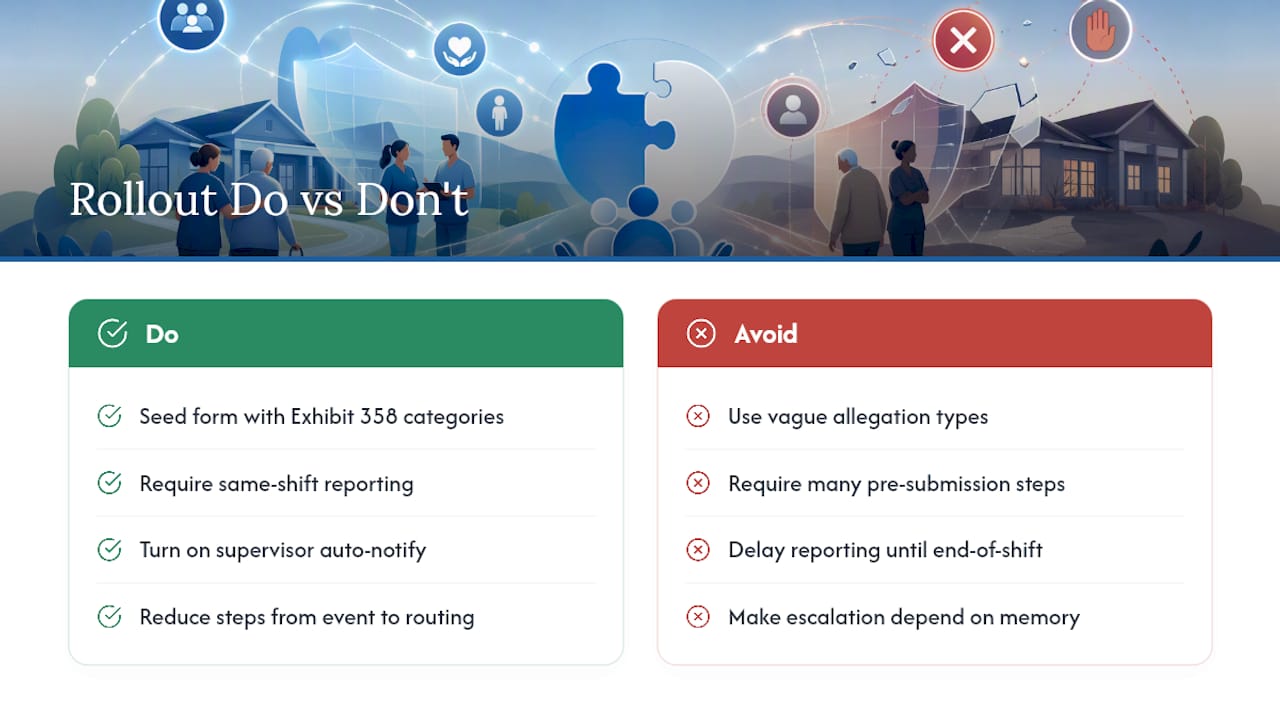
The fix is usually simpler than leadership expects. Seed the form with the exact allegation categories from Exhibit 358, so nobody has to interpret CMS language on the fly. Push for same-shift reporting instead of end-of-shift, since delay is where the 2-hour window gets missed most often. Turn on supervisor auto-notify so escalation doesn’t depend on someone remembering to make a call.
MyLTCApps built its daily shift reporting workflow around that same principle: reduce the steps between “something happened” and “it’s documented and routed.” Facilities that lower friction see reporting volume go up, not down, and that’s usually a sign the system is working, not a sign of a worsening problem.
— Philip
Meet CMS Requirements Without Building Your Own System
Facilities piecing together incident reporting from paper forms, email chains, and a shared spreadsheet are the ones most likely to miss a 2-hour window or lose the timestamp that proves they didn’t. There are platforms with seeded compliance libraries, configurable escalation rules, and mobile-first entry that let staff report from the floor and notify administrators automatically, avoiding the need for custom builds or IT projects.

The compliance task and daily checklist module maps directly to the workflow this article describes, from Exhibit 358 field alignment to QAPI ticket handoff. Facilities in Kansas can also review state-specific readiness configuration built around KDADS expectations. If your current process depends on someone remembering to escalate correctly, request a walkthrough of how MyLTCApps configures those rules automatically, so the system enforces the timeline instead of your staff’s memory.
FAQ
What Is the Federal Timeline for Reporting Nursing Home Abuse?
Allegations involving serious bodily injury or a suspected crime require reporting within 2 hours of the facility becoming aware. All other reportable allegations fall under a 24-hour window, per CMS’s State Operations Manual.
What Fields Belong on an Internal Abuse-Reporting Form?
At minimum: facility name and CCN, allegation type, date and time the facility became aware, a narrative of the allegation, notifications to outside agencies, and reporter contact information, matching the Exhibit 358 sample form.
Who Inside the Facility Should Receive Escalated Reports?
The administrator or a formally designated representative, with a defined backup for off-hours coverage, so escalation never depends on one person being reachable.
How Long Do Facilities Have to Report Investigation Results?
When an investigation is required, results must go to the administrator and State Survey Agency within 5 working days of the initial allegation, under CMS timing rules.
Can Software Like MyLTCApps Help Meet These Requirements?
Yes. A phone-first platform with Exhibit 358-aligned templates, automated escalation, and timestamped audit trails helps facilities capture required fields and hit federal timing without relying on manual tracking.